The desk is a mess, but you only have this one shot of the product
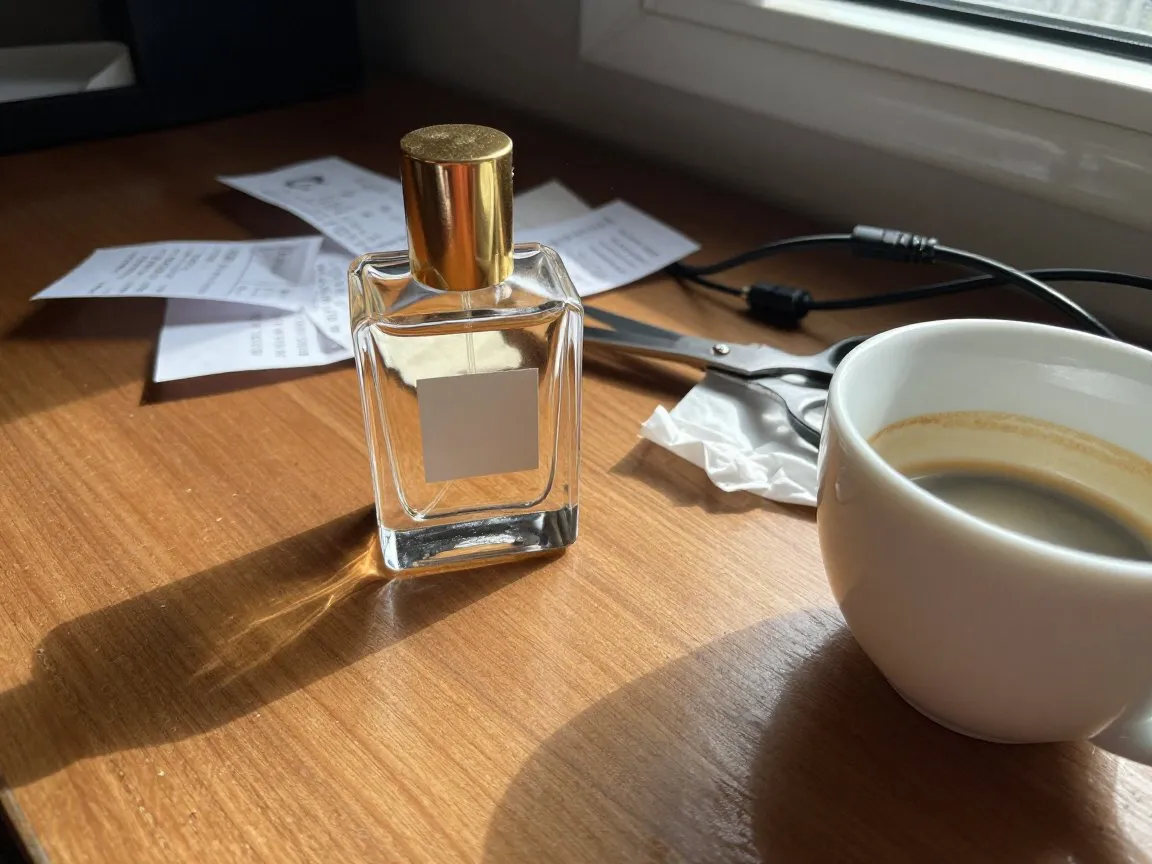
You didn't tidy up before shooting — the coffee cup, scissors, charging cable and takeout receipt are all in frame. Reshooting means relighting; otherwise you have to make do. This template deletes one item per pass and rebuilds the tabletop behind it. 20 credits, 39 seconds.

Most small-brand product photos are shot at your own desk: one table, one window's worth of light, and the coffee you just finished sitting right there. By the time you're ready to list the product, you realize the background is full of things that shouldn't be there.
Photoshop's healing brush can delete them, but the texture won't match: the wood grain breaks, the fabric gets smeared, and deleting three things in one go basically ruins the shot.
The key to the prompt is "rebuild", not "erase"
"Remove {clutter} from the photo completely, as if it had never been there, and rebuild what was behind it — same surface, same texture grain, same lighting falloff".
The important part is the second half: not smearing the object into a blur, but reconstructing what was behind it — the same surface, the same texture grain, the same lighting falloff. That's the only way to avoid seams, repeated patterns or leftover edges.
Then three constraints: the product itself doesn't move at all (shape, proportions, color, material, label text), no repositioning, no changes to crop, perspective or color temperature.
One more is about pacing: "Remove only this one thing in this pass" — one item per pass, then run the rest again.
What's most worth learning from this prompt is that it acknowledges its limits: it doesn't pretend it can clear everything in one go, it writes "one at a time" into the rules.
Before you start: sign-in and credits
Sign in. Open slloy.com, click "Sign in" in the top right, enter your email, and type in the 6-digit verification code. The site only supports code-based sign-in, no password — just remember which email you used.
Credits. Generation is charged per run; this one is 20 credits (about $0.13 on the largest plan, up to $0.60 on the smallest). Your balance is in the account panel in the top right — click to open it. If the balance is too low, the page tells you directly, so you won't be charged for nothing.
Does this one need an uploaded image? Yes — it's a "keep the original, change one thing" template. Without an upload you'll get a product the model made up, and credits are still charged. There's a reference image upload slot in the left column; just drag your photo in.
What the interface looks like. Once you're in the generator, the left column from top to bottom is: image/video toggle, model (Seedream 5.0 for this one), prompt library (shows "preset loaded" — the template has already filled in the wording), prompt input box, style preset, aspect ratio, number of images, and the generate button at the bottom — on a long page you may need to scroll down a bit to see it. The right column is the preview area and recent works.
Steps: one image, four runs
Step 1 — Use case "Retouch a photo" → "Product photo clutter removal" → Generate this template.
Step 2 — Upload the original image. Fill {clutter} with one thing, as specific as possible: "the white coffee cup on the left", not "clutter".
Step 3 — 20 credits, generate. Take the result as your new original, upload it again, and delete the next item. This time four items took four rounds, about 39 seconds each.
Placeholder cheat sheet
The template has 2 slots wrapped in curly braces, and you need to replace all of them with your own content — leave them unfilled and the model will make something up. The right column has sentences you can paste straight in; get it working first, then edit.
All four items cleared, but one shadow slipped through
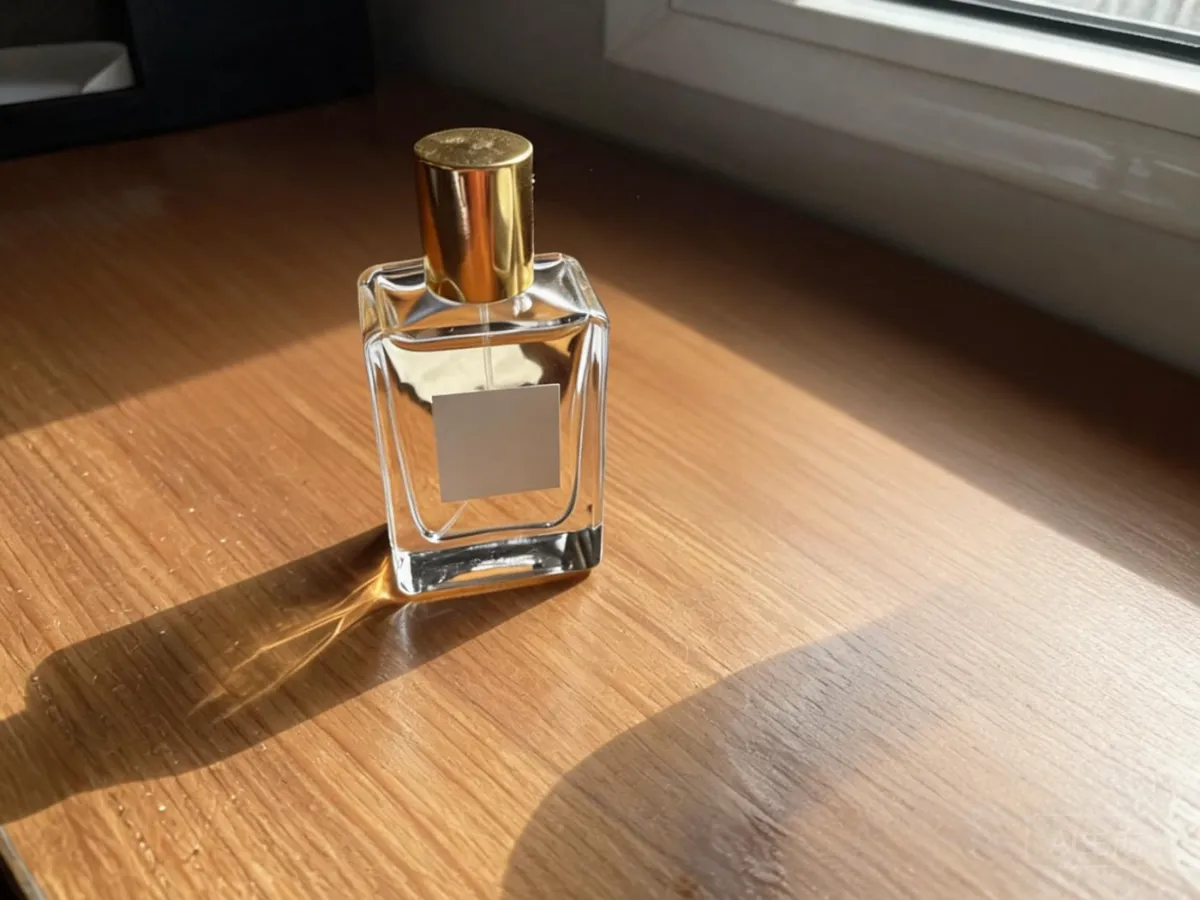
The cup, scissors, charging cable and receipt are all gone, the tabletop texture is continuous with no obvious seams, and the product itself hasn't changed at all — shape, position and label are all where they were.
But the original cup's shadow was left in the bottom-right corner. A patch of shadow that belonged to the cup, sitting there alone on the tabletop. The template's notes mention this flaw: the model often remembers to delete the object but forgets to delete its shadow.
The fix: run another pass and write {clutter} as "the white coffee cup on the left, and the shadow it casts on the tabletop". Treat the shadow as its own deletion target, and only then will the model handle it.
Another common failure: on surfaces with regular patterns like wood grain, tile or fabric, the rebuild can produce a repeated patch of pattern. When you spot it, change the deletion order — remove items near the edge of the frame first, and items sitting on large areas of texture last; the odds of it giving itself away drop a lot.
After the image comes out: download, check, redo
Don't click repeatedly while you wait. This one took 39 seconds. The page shows a placeholder block or blurred preview first, and the result appears once progress finishes. Clicking "Generate" again charges another 20 credits, and the two jobs queue behind each other.
Download and naming. There's a download button below the result, and what you get is the original at the generated size. Put the use and date in the filename when you save it (e.g. etsy-pin-2026-11-15-v1) so you don't have to dig through chat logs a week later.
Three checks. One, has the main structure deformed (bottle turned into a cylinder, wrong number of fingers, furniture floating off the floor); two, are there typos in any text in the image; three, are there dirty spots or extra props at the edges. If all three pass, you're done.
If you're not happy, change one sentence and run again. Don't rewrite the whole thing — a rewrite means a new direction and throws out all your earlier judgment. Go back to the "All four items cleared, but one shadow slipped through" section above and change just one sentence the way it describes, then spend another 20 credits on one run. Failed jobs are refunded automatically, but they are not retried automatically — you need to click again yourself.
Cost
- 20 credits per image (about $0.13 on the largest plan, up to $0.60 on the smallest), charged once per item removed
- Four clutter items = 80 credits (40 minutes of manual retouching, roughly $15–40 in money terms)
- Recommendation: tidy the desk when you shoot; keep this one for emergencies, not as a routine step
- Ordering principle: one item at a time, shadows last
Related posts
Cinematic rainy neon: an image with a story, no photographer needed
2026-11-15 · Tutorials · 5 min read
Need a product image before you've shot anything: studio-grade shot, 20 credits
2026-11-15 · Tutorials · 5 min read
Studio portrait: 85mm, soft light, real pores, no plastic look
2026-11-15 · Tutorials · 4 min read