No product photos yet? Get a studio-grade product shot first
You need a pre-order page during sampling, a packaging proposal for retailers, or a round of ad creative to test — and none of these can wait for a photographer's schedule. This template needs no image upload: describe the product in one sentence and get a studio shot. 20 credits (about $0.13–0.60), 48 seconds.

A decent studio product photo runs $100–250 in the US, including lighting, shooting and basic retouching, with a lead time of a week or more. If you just need to see how something looks during sampling, or you're testing a round of ad creative, that money feels badly spent: the image may only be used for two weeks, and the product isn't finalized yet.
The more common scenario is a proposal. You need to show a retailer, a factory or an investor what this bottle will look and feel like when it's made, and all you have is a phone snapshot of a sample. They can't see how clear the glass is, or how the gold cap reflects light.
Why one sentence is enough for this prompt
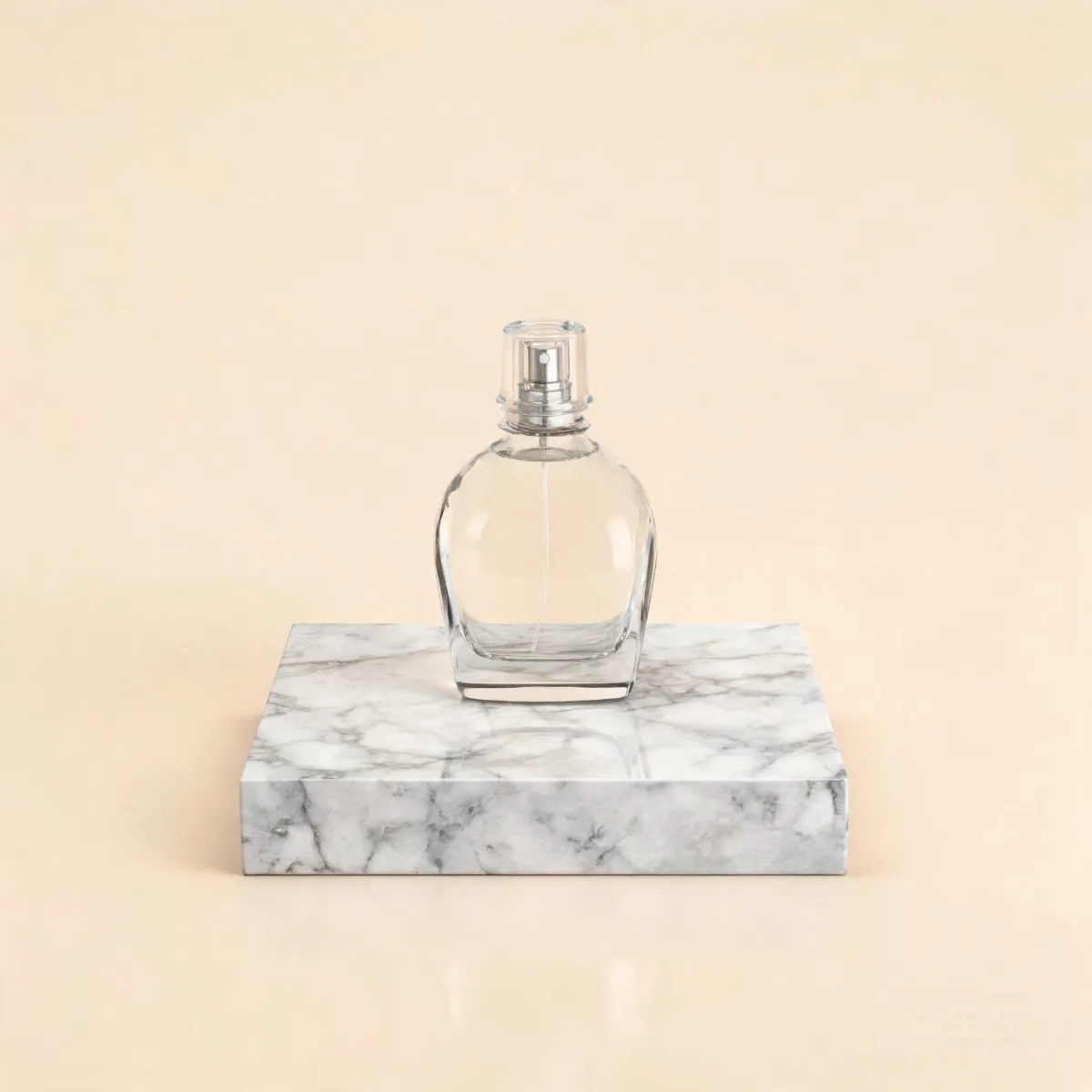
The original is a single long sentence: "Studio product photography of a glass perfume bottle on a marble podium, softbox lighting, subtle reflections, clean beige background, commercial shot".
It actually packs in six things: the shooting style (studio product photography), the subject (glass perfume bottle), the pedestal (marble podium), the light (softbox), the material detail (subtle reflections), the background (clean beige), and finally "commercial shot" sets the tone.
What's notable is that it has no negative list at all. Editing templates (background swaps, object removal) carry a long list of "don't touch this, don't change that" because they have to preserve what you uploaded; this one is pure text-to-image, with no source image to protect, so the emphasis isn't on "forbid" but on "say everything." Leave one thing out and the model fills it in itself.
The order for editing this prompt: first set the product material (glass/metal/fabric/wood), then the pedestal (marble/acrylic/wood/concrete), and finally the background color. The lighting follows the material — glass needs side-backlight to look clear, fabric needs soft light to avoid hard shadows.
Before you start: login and credits
Log in. Open slloy.com, click "Log in" in the top right, enter your email, and type in the 6-digit verification code. The site only supports code-based login, no password — just remember which email you used.
Credits. Generation is charged per run; this one is 20 credits (about $0.13 on the largest plan, up to $0.60 on the smallest). Your balance is in the account panel in the top right — open it to see it; if you're short, the page tells you directly and won't charge you for nothing.
Do you need to upload an image first? No — the prompt is complete on its own, so leave the upload box empty. Uploading an extra image only makes it unclear which one the model should follow.
What the interface looks like. Once you're in the generator, the left column from top to bottom is: image/video toggle, model (Seedream 5.0 for this one), prompt library (shows "preset loaded" — the template has filled in the words for you), prompt input box, style presets, aspect ratio, number of images, and the generate button at the very bottom — on a long page you may need to scroll down a bit to see it. The right column is the preview area and recent works.
Steps: three, no upload needed
Step 1 — Prompt library → use case "Sell a product" → find "Commercial · Product Studio Shot" → click "Generate this."
Step 2 — The prompt is already filled in the generator; swap the subject, pedestal and background for yours. The model is Seedream 5.0, 20 credits per image. This template doesn't require a reference image, so leave the upload box empty.
Step 3 — Choose 1:1 (the standard for marketplace main images) and click generate. This run took 48 seconds.
How good is the output
The studio feel is there: the glass is clear, the gold cap has a softbox reflection strip, the marble surface shows its grain direction, and the background is clean with no gradient smudges. Scaled down to listing size, it's hard to tell from a real photographer's work.
The flaw is at the seam between the marble pedestal and the back wall — the surface looks a bit like it's "floating," and the seam isn't clear. Zoom in and it shows; in a thumbnail you can't tell.
The fix: add a sentence at the end of the prompt: "a clear boundary line between the pedestal and the back wall, a soft contact shadow under the product, shadow direction matching the key light." This is the most common failure point in AI product images — it's good at drawing objects, not at expressing "what this object is sitting on."
After the image comes out: download, check, redo
Don't click repeatedly while you wait. This run took 48 seconds. The page shows a placeholder block or blurry preview first, and the finished image appears when progress completes. Clicking "Generate" again charges another 20 credits, and the two jobs queue behind each other.
Download and naming. There's a download button below the result; what you get is the original at the generated size. Put the use and date in the filename when you save it (e.g. etsy-pin-2026-11-15-v1) so you don't have to dig through chat history a week later.
Three checks. One, is the subject's structure distorted (bottle turned into a cylinder, wrong number of fingers, furniture floating off the floor); two, is there any misspelled text in the image; three, are there smudges or extra props at the edges. If all three pass, you're done.
If you're not happy, change one sentence and run again. Don't rewrite the whole thing — a rewrite means a new direction and throws out all your earlier judgment. Go back to the "How good is the output" section above and change just one sentence the way it describes, then spend another 20 credits on one more run. Failed jobs are refunded automatically, but they are not retried automatically — you need to click again yourself.
When to use it, and when you must shoot for real
- 20 credits per image (about $0.13 on the largest plan, up to $0.60 on the smallest), 48 seconds this run
- Usually takes 2–3 rounds to be satisfied; budget 40–60 credits
- For comparison: a photographer is $100–250 per image, a half-day studio rental starts at $300
OK to use: sampling-stage mockups, pre-order pages, packaging and retail proposals, ad creative A/B testing, internal reviews.
Must shoot for real: Amazon main images (the product must match the real item exactly), images that need to show true dimensions and scale, and packaging images with real label text. These three will get you complaints, or even delisting, if you use generated images.
Related posts
Cinematic rainy neon: an image with a story, no photographer needed
2026-11-15 · Tutorials · 5 min read
Studio portrait: 85mm, soft light, real pores, no plastic look
2026-11-15 · Tutorials · 4 min read
Cyberpunk Rainy Night City: Teal and Magenta, the Character's Features Won't Fall Apart
2026-11-15 · Tutorials · 5 min read