An empty room sits for three months with no inquiries; stage it and you get showings within a week
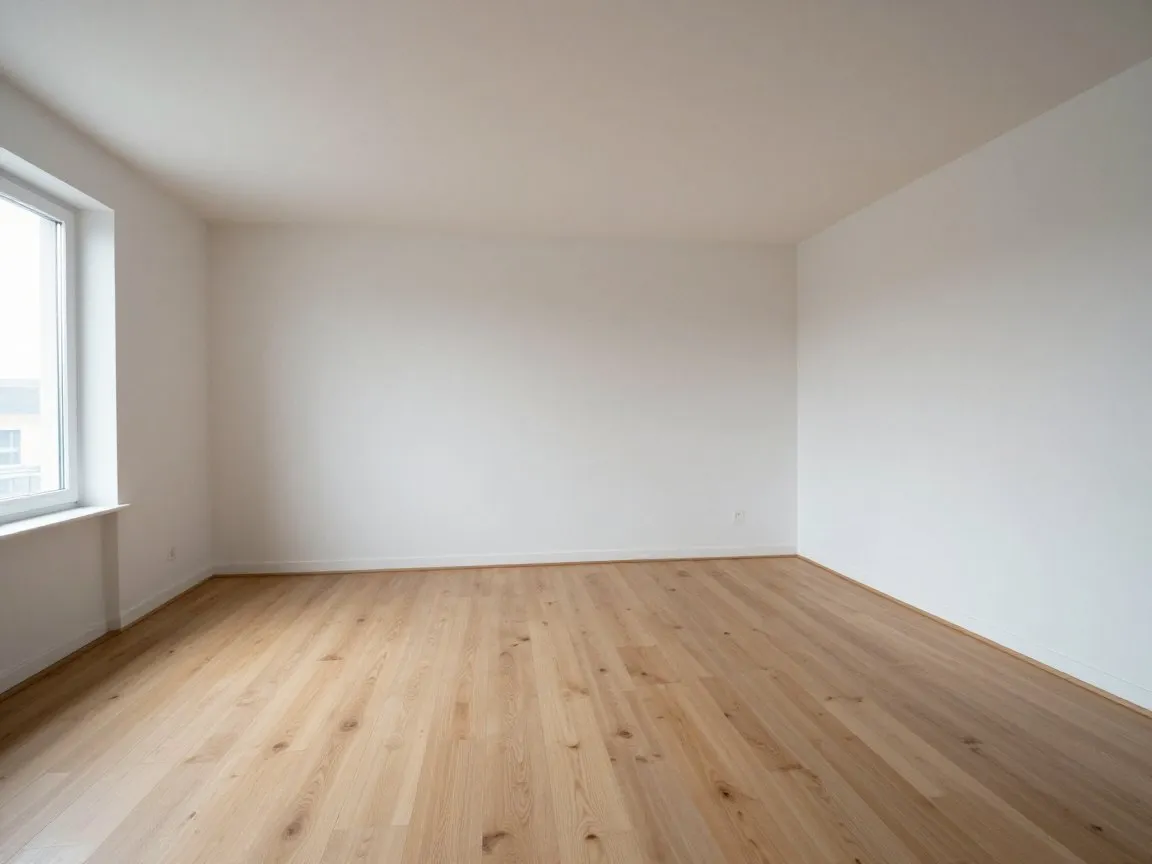
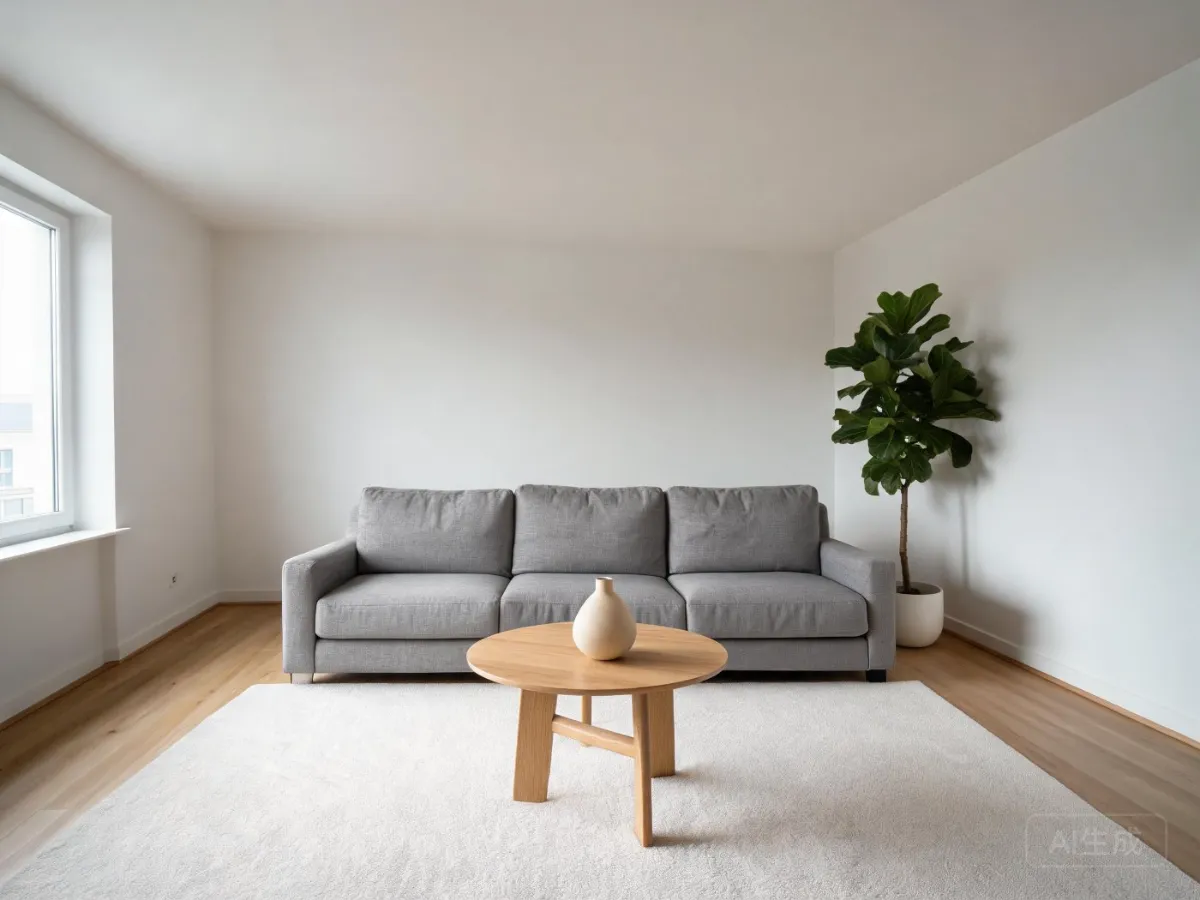
Buyers looking at photos of an empty room can't tell whether it's a living room or a bedroom, or how large a sofa would fit. This template places three to five pieces of furniture from the list you provide, and leaves the walls, windows, floor and camera angle untouched. 20 credits, 52 seconds.

In US real estate photography, virtual staging is standard practice: empty homes get noticeably fewer showing requests than the same floor plan when furnished. Physical staging means renting furniture, hauling it in, setting it up and tearing it down again — $1,500–3,000 per home; outsourced virtual staging runs $25–75 per image.
The problem with outsourcing is speed: send the photo, wait a day, revise one version — and when you're competing for a listing, you can't afford to wait.
The harshest line in the prompt is "don't move anything"
Lock the room first: "Keep everything already in the frame unchanged — same walls, window position, floor, ceiling line and camera angle." Walls, windows, floor, ceiling line, camera angle — all five locked. This line is the dividing line between virtual staging and "regenerating a room."
Then lock the number and source of furniture: "Add three to five items in total, chosen from this list and nothing else: {furniture}." Three to five pieces, chosen only from the list, nothing added on its own. The more furniture, the faker it looks; this line hard-caps it.
Then handle grounding: "Stand every piece on the floor plane so nothing floats and every leg meets a surface; align rugs with the room's existing perspective and vanishing point." Every leg must touch the floor, and the rug must follow the room's existing perspective and vanishing point.
Finally, handle the light: "Match the direction, hardness and colour temperature of the light already visible in the room," plus correct contact shadows and ambient occlusion.
Don't forget the closing line: "do not add people, pets or text." Staged images with people or pets require extra disclosure in the US, and many MLSs won't accept them at all.
Before you start: sign-in and credits
Sign in. Open slloy.com, click "Sign in" in the top right, enter your email, and type in the 6-digit code you receive. The site only supports code-based sign-in, no password — just remember which email you used.
Credits. Generation is charged per run; this one costs 20 credits (about $0.13 on the largest plan, up to $0.60 on the smallest). Your balance is in the account panel in the top right — open it to see it; if you're short, the page tells you outright and won't charge you for nothing.
Does this one need an uploaded image first? Yes — it's a "keep the original, change one thing" template, and without an image you'll get a product the model made up, with the credits still charged. There's a reference-image upload slot in the left column; just drag your photo in.
What the interface looks like. Once you're in the generator, the left column from top to bottom is: image/video toggle, model (Seedream 5.0 for this one), prompt library (shows "preset loaded" — the template has filled in the wording for you), prompt input box, style presets, aspect ratio, number of images, and the generate button at the very bottom — on a long page you may need to scroll down a little to see it. The right column is the preview area and recent works.
Steps: one empty-room photo + one furniture list
Step 1 — Use case "edit a photo" → "empty-room virtual staging" → generate the same.
Step 2 — Upload a photo facing straight into the room, with the whole room in frame and no people. Fill {room} with the room type ("an empty south-facing living room, wood floor, white walls") and {furniture} with the list: three pieces, warm Scandinavian style, sofa + armchair + rug.
Step 3 — Match the original image's aspect ratio, 20 credits, generate. This run took 52 seconds — slower than the other retouching templates in the group, because it has to rebuild an entire space.
Placeholder cheat sheet
The curly-braced slots in the template are blanks — 2 in total, all of which you need to replace with your own content; leave them unfilled and the model makes something up. The right column has sentences you can paste straight in; get it running first, then edit.
Why this image doesn't give itself away
Every piece of furniture sits on the floor, nothing floats; the rug's perspective lines up with the room's vanishing point, rather than looking like a flat sticker pasted on; the light comes in from the window side and the furniture's light and shadow follow it; the windows, wall lines and ceiling line haven't moved a hair — it's still the same room, just with three more pieces of furniture.
Real estate images are most afraid of looking fake, and almost all of this prompt's constraints are spent on preventing that: every piece grounded, perspective aligned to the existing vanishing point, light direction following the existing window light, room structure not allowed to move a single centimetre.
Three checkpoints, and one compliance requirement
Step 1 — Count the legs. Sofa feet, chair legs, coffee-table legs — every one must touch the floor. Swap out any piece that floats — switching to a simpler structure (a legless sofa, a floor lamp) is faster than rerunning five times.
Step 2 — Check the light direction. If the window is on the left in the original, the highlights on the new furniture must be on the left. Get the direction wrong and it looks fake at first glance.
Step 3 — Check the rug. The rug's edges should be parallel to the room's perspective lines, not "a sticker."
Compliance: virtual staging must be disclosed in the US. The NAR Code of Ethics requires that it not be misleading, and most MLSs have a dedicated "virtually staged" field. Before publishing, confirm three things: the caption states it's virtually staged, it isn't used to misrepresent the property's actual condition, and it doesn't hide defects (cracks, water stains).
After the image comes out: download, review, rework
Don't click repeatedly while you wait. This run takes 52 seconds. The page shows a placeholder block or blurred preview first, and the finished image appears once progress completes. Clicking "generate" again charges another 20 credits, and the two jobs queue behind each other.
Download and naming. There's a download button below the result; what you get is the original image at the generated size. Put the use and date in the filename when you save it (e.g. etsy-pin-2026-11-15-v1) so you don't have to dig through chat logs a week later.
Three review checks. One, has the main structure deformed (a bottle turned into a cylinder, the wrong number of fingers, furniture off the ground); two, are there typos in any text in the image; three, are there dirty spots or extra props at the edges. If all three pass, leave it alone.
If you're not happy, change one line and rerun. Don't rewrite the whole thing — a rewrite means changing direction, and all your earlier judgement is wasted. Go back to the "Three checkpoints, and one compliance requirement" section above and change just one line the way it describes, then spend another 20 credits on a run. Failed jobs are refunded automatically, but they are not retried automatically — you need to click again yourself.
Cost
- 20 credits per image (about $0.13 on the largest plan, up to $0.60 on the smallest), 52 seconds this run
- A listing usually needs 6–10 angles; doing them all = 120–200 credits
- For comparison: outsourced virtual staging is $25–75 per image, physical staging $1,500–3,000 per home
- Time math: a day round-trip for outsourcing, versus a minute per version here — you can produce three options and let the seller choose
Related posts
Cinematic rainy neon: an image with a story, no photographer needed
2026-11-15 · Tutorials · 5 min read
Need a product image before you've shot anything: studio-grade shot, 20 credits
2026-11-15 · Tutorials · 5 min read
Studio portrait: 85mm, soft light, real pores, no plastic look
2026-11-15 · Tutorials · 4 min read