You want an image that "looks like a film still" — but your budget only covers a cup of coffee
Blog headers, podcast episode covers, novel scene art, brand story pages — these spots all want an image with mood, not the fake smiles from a stock library. This template uses rain, neon and rim light to create a cinematic feel. 20 credits, 41 seconds.

Stock-library "cinematic" photos have three common problems: too clean, too bright, too much like an ad. What you need is an image that's a little dirty, a little nocturnal, a little uncertain.
Hiring a photographer for a shot like this starts at $300; a stock subscription runs $15–30 a month, but the whole site is using the same batch.
The four cinematic elements in the prompt
Subject: "a lone detective in a long coat" — one person, one long trench coat. The simpler the subject, the more easily it reads as a "story" rather than an "ad."
Setting: "walking through a rainy neon alley at night" — rain, neon, alley, night. With all four present, half the atmosphere is already there.
Reflections: "puddles mirroring the signs" — the standing water on the ground reflects the signage. This is the most effective line in the whole prompt: wet ground duplicates the light, and the image instantly gains layers and depth.
Light and depth of field: "dramatic rim light, shallow depth of field" — rim light separates the subject from the background, and shallow depth of field blurs half the distance. Together these two create the "film lens" look.
It doesn't specify aspect ratio, lens model, or "8K." Writing fewer of these words is actually more reliable — they're "quality spells," and the more you write, the more AI-generated the image looks.
Before you start: login and credits
Log in. Open slloy.com, click "Log in" in the top right, enter your email, and type in the 6-digit verification code. The site only supports code-based login, no password — just remember which email you used.
Credits. Generation is charged per run; this one costs 20 credits (about $0.13 on the largest plan, up to $0.60 on the smallest). Your balance is in the account panel in the top right — click to open it and you'll see it; if the balance is insufficient, the page tells you directly and won't charge you for nothing.
Do I need to upload an image first for this one? No — the prompt is a complete description, so leave the upload box empty. Uploading an extra image actually makes it harder for the model to tell which one to follow.
What the interface looks like. After entering the generator, the left column from top to bottom is: image/video toggle, model (Seedream 5.0 for this one), prompt library (shows "preset loaded" — the template has already filled in the words for you), prompt input box, style presets, aspect ratio, number of images, and at the very bottom the generate button — on a long page you may need to scroll down a bit to see it. The right column is the preview area and recent works.
Steps: two steps, no upload needed
Step 1 — Use case "Make a cover" → "Cinematic · Rainy Neon" → Generate the same.
Step 2 — The prompt is already filled in; change the subject and location if you want. 20 credits, generate. This time: 41 seconds.
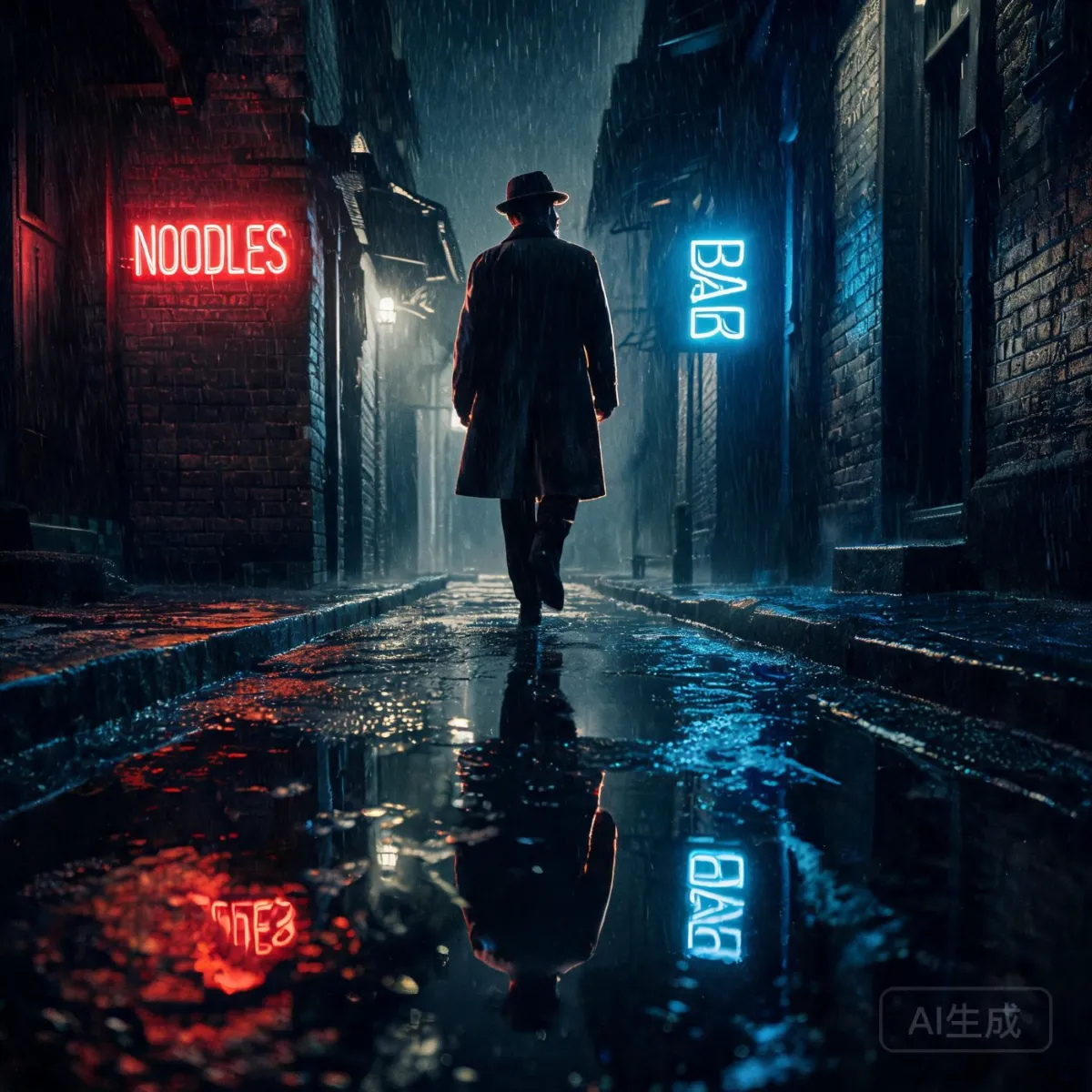
Ready to use
The mood is right: the density of the rain streaks, the neon reflected on the water's surface, the cool rim light along the subject's shoulder line — none of this is the "standard night scene" you can buy from a stock library. The background blur is reasonable, the distant signs dissolve into a cluster of light spots, and the subject holds up.
You can submit the Chinese prompt as-is, no need to translate it into English — this was confirmed in testing, and the output basically matches the sample on the card.
Keep three things when changing the scene
Step 1 — One clear subject. More than two and the attention scatters.
Step 2 — A surface that reflects. Wet ground, glass curtain wall, polished tabletop, water surface — any of these work. Without reflections, the image instantly goes flat.
Step 3 — A beam of hard light with direction. Neon, car headlights, streetlights, coming from the side or behind. Flat frontal light is just an ID photo.
How to write it for daytime: "Cinematic film still of a lone cyclist on a wet street at dawn, low sun behind, long shadows, reflections on the asphalt, shallow depth of field" — same structure, swapped for morning light and long shadows.
After the image comes out: download, check, redo
Don't click repeatedly while waiting. This time it took 41 seconds. The page shows a placeholder block or blurred preview first, and only when progress completes do you get the final image. Clicking "Generate" again charges another 20 credits, and the two tasks will queue behind each other.
Download and naming. There's a download button below the result, and what you get is the original image at the generated size. When saving, put the use and date in the filename (e.g. etsy-pin-2026-11-15-v1) so you don't have to dig through chat history a week later.
Three checks. One, is the subject's structure distorted (bottle turned into a cylinder, wrong number of fingers, furniture floating off the ground); two, are there typos in any text in the image; three, are there dirty spots or extra props at the edges. If all three pass, you don't need to touch it again.
If you're not satisfied, change one sentence and run again. Don't rewrite the whole thing — rewriting means changing direction, and all your earlier judgment is wasted. Go back to the "Keep three things when changing the scene" section above and change just one sentence the way it describes, then spend another 20 credits on one more run. Failed tasks are automatically refunded, but they are not automatically retried — you need to click again yourself.
Cost
- 20 credits per image (about $0.13 on the largest plan, up to $0.60 on the smallest), 41 seconds this time
- Three directions for one podcast cover = 60 credits
- Comparison: a photographer shooting a set of mood images costs $300–800; a stock subscription is $15–30/month but heavily homogenized
- Good for: blog headers, podcast covers, novel/screenplay scene art, brand story pages
Related posts
Need a product image before you've shot anything: studio-grade shot, 20 credits
2026-11-15 · Tutorials · 5 min read
Studio portrait: 85mm, soft light, real pores, no plastic look
2026-11-15 · Tutorials · 4 min read
Cyberpunk Rainy Night City: Teal and Magenta, the Character's Features Won't Fall Apart
2026-11-15 · Tutorials · 5 min read