A landing page needs a face, but a model costs $500 a day
When you're building a product site, demo images or brand visuals, you always need a shot of "a person using it." Hiring a model, renting a studio and booking makeup runs $500–1,500 a day. This template needs no image upload — one sentence produces a studio portrait. 20 credits, 39 seconds.

Stock portraits share the same flaws: smiles that are too broad, retouching that looks fake, clothes that are out of date. And you'll see the same face on ten competitor websites.
This template serves a different need: a clean, neutral studio portrait with real skin texture, to serve as the "person" in your layout.
Five professional decisions in one sentence
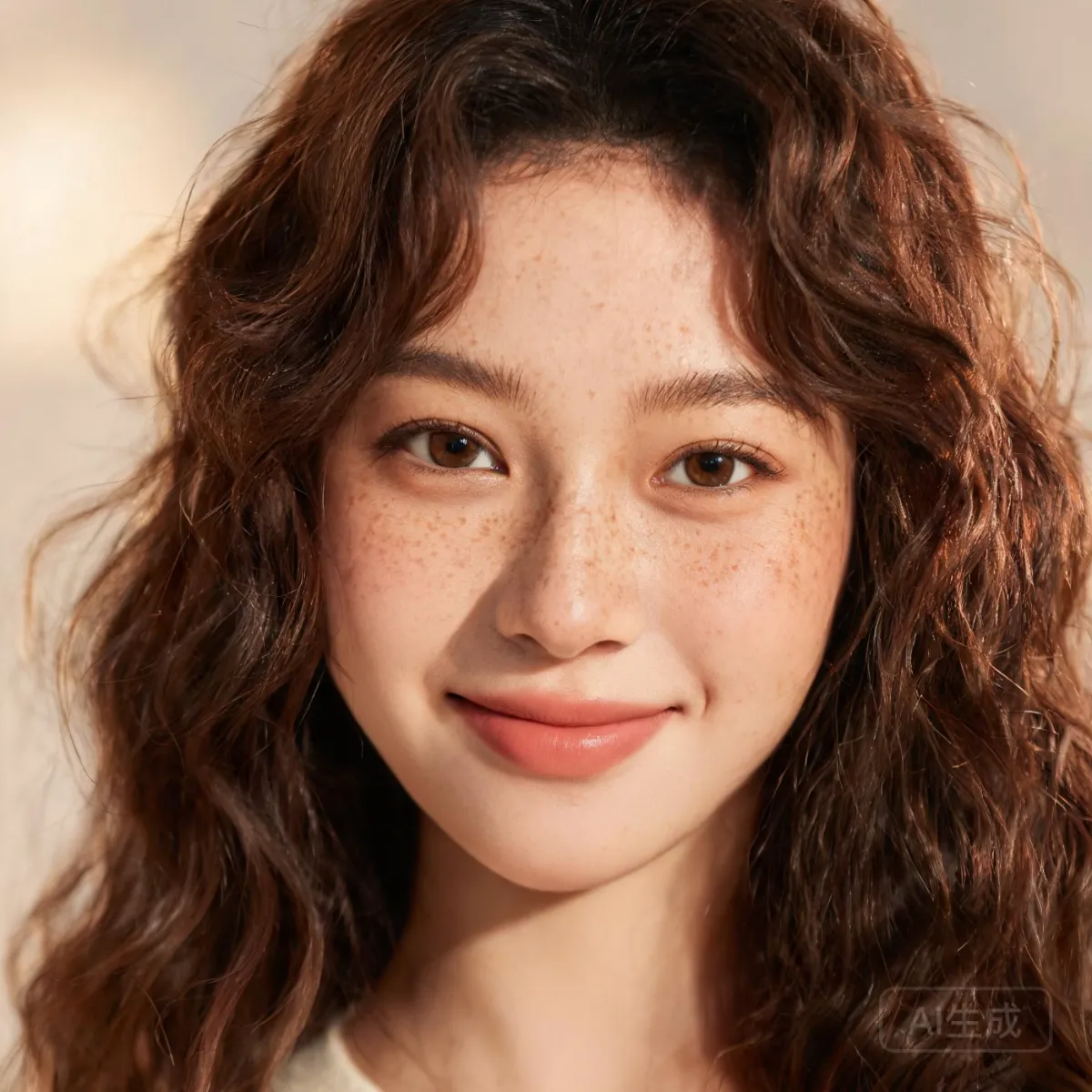
"Photorealistic studio portrait" — a realistic studio portrait. This combination produces the standard composition of "frontal, medium shot, clean background" rather than a casual snapshot.
"freckles and curly hair" — freckles and curly hair. These two features matter: freckles force the model to handle real skin detail, and curly hair forces it to handle complex highlight direction. They are a natural immunity to the "plastic look."
"natural skin texture" — natural skin texture. This is the anti-airbrushing keyword, and also the pass/fail standard: it only counts if you can zoom in and see pores.
"soft key light" — soft key light. Without hard light, the face won't get dramatic shadows, which makes it suitable as general-purpose material.
"85mm lens" — 85mm, the standard focal length for portrait lenses. It brings the right spatial compression: no facial distortion, natural background blur.
"warm neutral backdrop" — a warm neutral background. Not pure white and not gray, but a beige with warmth. This base color pairs most reliably with text and won't clash with brand colors.
Before you start: login and credits
Log in. Open slloy.com, click "Log in" in the top right, enter your email, and type in the 6-digit verification code. The site only supports code-based login, no password — just remember which email you used.
Credits. Generation is charged per run; this one costs 20 credits (about $0.13 on the largest plan, up to $0.60 on the smallest). Your balance is in the account panel in the top right — click to open it. If your balance is too low, the page tells you directly, so you won't be charged for nothing.
Does this one need an image upload first? No — the prompt is complete on its own, so leave the upload box empty. Uploading an extra image only makes it harder for the model to tell which one to follow.
What the interface looks like. After you enter the generator, the left column from top to bottom is: image/video toggle, model (Seedream 5.0 for this one), prompt library (shows "preset loaded" — the template has filled in the words for you), prompt input box, style presets, aspect ratio, number of images, and at the very bottom the generate button — on long pages you need to scroll down a bit to see it. The right column is the preview area and recent works.
Steps: two of them
Step 1 — Use case "Retouch a headshot" → "Portrait · Studio photo" → Generate the same.
Step 2 — 20 credits, generate. This run took 39 seconds. Choose 1:1 for a square image, 16:9 for a landing page banner.
The skin is real, not airbrushed
Zoom in on the cheeks: pores, tiny pigment spots and fine hairs are all there — not the flat, plastic face of a single layer of even light. The freckles are unevenly distributed — some dark, some light, some merging into patches — which is exactly what real skin looks like.
The highlights in the curly hair are scattered, with layer upon layer in each strand, not smeared into one blob. The background is warm beige with no dirty gradient spots. The whole image can go straight into a layout — pair it with one line of headline and it works.
When to use it, and when not to
Good for: avatar placeholders in the "user reviews" section of a landing page, the person in a product demo image, human elements in brand visuals, blog author avatars, presentation illustrations.
Not good for: real user personas that need a specific race/age/body type (their authenticity will be questioned), team pages that need to match real people (use the team headshot template), or any scenario that needs "this is our real employee."
Two reminders: first, don't generate faces that look like celebrities — using them in ads is risky; second, if you're putting them in "user reviews," it's best to label them as illustrative to avoid misleading people.
After the image comes out: download, check, rework
Don't click repeatedly while you wait. This run took 39 seconds. The page first shows a placeholder block or blurry preview, and only when progress finishes do you get the final image. Clicking "Generate" again deducts another 20 credits, and the two jobs queue behind each other.
Download and naming. There's a download button below the result, and what you get is the original image at the generated size. When saving, put the purpose and date in the filename (for example etsy-pin-2026-11-15-v1) so you don't have to dig through chat logs a week later.
Three checks. One, is the subject's structure distorted (a bottle turned into a cylinder, the wrong number of fingers, furniture floating off the floor); two, are there typos in any text in the image; three, are there dirty spots or extra props at the edges. If all three pass, you don't need to touch it again.
If you're not satisfied, change one sentence and run again. Don't rewrite the whole thing — a rewrite means changing direction, and all your earlier judgment is wasted. Go back to the "The skin is real, not airbrushed" section above and change just one sentence the way it describes, then spend another 20 credits on one more run. Failed jobs are refunded automatically, but they are not retried automatically — you need to click again yourself.
- 20 credits per image (about $0.13 on the largest plan, up to $0.60 on the smallest), 39 seconds this run
- A full layout needs 3–5 different people = 100 credits
- For comparison: a model costs $500–1,500 a day; a stock subscription is $15–30/month but the faces repeat
- Copyright: generated images can be used commercially, but don't let them resemble real celebrities
Related posts
Cinematic rainy neon: an image with a story, no photographer needed
2026-11-15 · Tutorials · 5 min read
Need a product image before you've shot anything: studio-grade shot, 20 credits
2026-11-15 · Tutorials · 5 min read
Cyberpunk Rainy Night City: Teal and Magenta, the Character's Features Won't Fall Apart
2026-11-15 · Tutorials · 5 min read