Buyers guess the wrong size, and you pay the return shipping
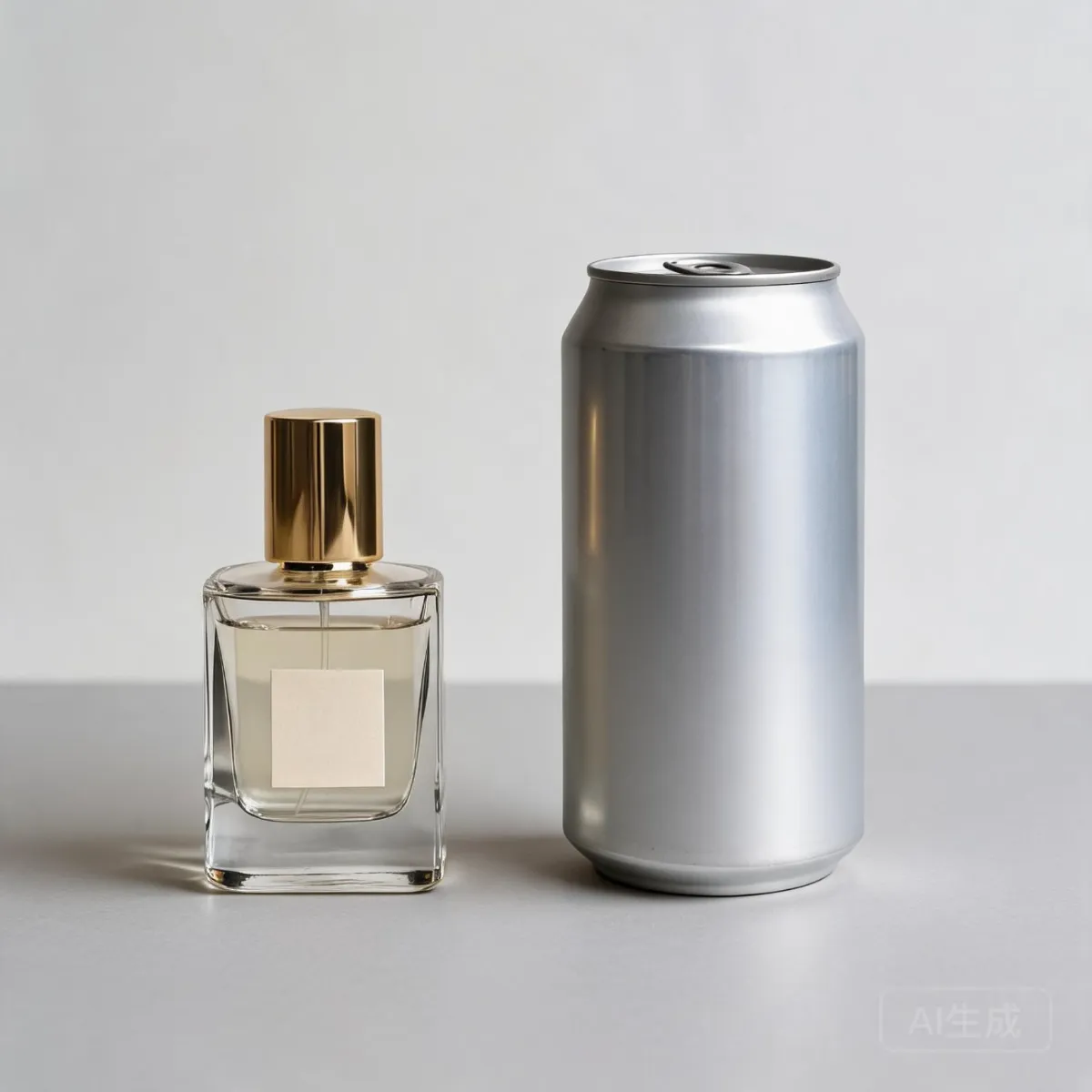
"Looks smaller than I imagined" is the most common reason in e-commerce returns. This template places the product and something everyone knows the size of side by side on the same plane—one shutter press solves size anxiety. 20 credits, 35 seconds.

An 8-ounce candle on a white background can look big or small. Buyers have no reference and can only imagine; when the imagination falls short, it's a return. The average reverse logistics cost of a single US return is $10–20, not counting the loss from relisting.
What it takes to shoot a real comparison photo: find a reference object, place both on the same plane, control the light on both sides, and align the verticals after shooting. Sounds simple, but making the perspective relationship between two objects look believable often takes a dozen or more retakes.
The prompt breaks "believable" into four conditions
Same plane: "both standing on the same plane at the same distance from the camera". Leave this sentence out and the model will draw the two objects at different depths, and the scale is ruined.
Soft light from one side: "lit by one soft even light so neither object shadows the other". If the two objects cast shadows on each other, viewers will think one is closer.
Camera position locked down: "45-degree angle at eye level on a 50mm lens, both objects in focus, verticals straight". 45 degrees is the standard angle for product comparison shots, 50mm avoids distortion, and only then do the verticals hold up.
Leave room for labels: "Leave generous empty space above and below for a measurement caption". The top and bottom margins are for the size labels you'll add later—many people miss this step and then have nowhere to put the text after the image is generated.
The template also includes the line "the product must not be enlarged, shrunk or floated to look bigger"—no enlarging the product to make it look bigger. This is a constraint on the model, and a reminder to sellers: once a comparison image is found to have been doctored, trust is gone.
Before you start: login and credits
Log in. Open slloy.com, click "Log in" in the top right, enter your email, and type in the 6-digit verification code you receive. The site only supports code-based login, no password—just remember which email you used.
Credits. Generation is charged per run; this one is 20 credits (about $0.13 on the largest plan, up to $0.60 on the smallest). Your balance is in the account panel in the top right—open it to see it; if your balance is too low, the page will tell you directly and won't charge you for nothing.
Do I need to upload an image first for this one? Yes—it's a "keep the original image, change only one thing" template; without an upload you'll get a product the model made up, and credits are still charged. There's a reference image upload slot in the left column—just drag your photo in.
What the interface looks like. Once you're in the generator, the left column from top to bottom is: image/video toggle, model (Seedream 5.0 for this one), prompt library (shows "preset loaded"—the template has already filled in the words for you), prompt input box, style presets, aspect ratio (default 1:1), number of images, and at the very bottom the generate button—on longer pages you'll need to scroll down a bit to see it. The right column is the preview area and recent works.
Steps: one image, one reference object
Step 1 — Use case "Sell a product" → "Size comparison image" → Generate this template.
Step 2 — Upload your product image (the whole item within the frame). Fill {product} with the product and {reference} with the reference object, written as "a 330ml can of cola, 4.8 inches tall". Include the specific dimensions so the model has something to go on.
Step 3 — 1:1, 20 credits, generate. This time 35 seconds—the fastest tier in this template, because the composition is simple and there's no complex background to rebuild.
Placeholder copy sheet
The template has curly-brace placeholders—2 in total—and you need to replace all of them with your own content. Leave them unfilled and the model will make something up. The right column has sentences you can copy straight in; get it running first, then tweak.
The image is believable, but don't fully trust the scale
The finished image looks great: both objects stand on the same horizon line, both have contact shadows, neither blocks the other's light, the verticals are straight, and there's enough margin above and below to add labels. It gives buyers a "roughly this big" impression, which is entirely enough.
But the scale is the model's guess. The template notes say it plainly: across three tests, the can and the mug were drawn at almost the same height, when the can should be a third taller. The model matches a sense of volume, not real dimensions.
So treat this image as a visual cue, not a measurement reference. Your listing must state length, width, and height clearly (in both inches and centimeters); the image and the numbers corroborate each other, and only then is it both attractive and safe.
Two more details: don't pick an obscure reference object (North American buyers have an instinct for a 330ml can, a credit card, a hand—not for some specific packaging); and when shooting the original, step back a little—a product pressed against the edge leaves no room in the composition.
After the image comes out: download, check, rework
Don't click repeatedly while you wait. This one takes 35 seconds. The page will show a placeholder block or a blurry preview first; the finished image appears when progress completes. Clicking "Generate" again charges another 20 credits, and the two jobs will queue behind each other.
Download and naming. There's a download button below the finished image; what you get is the original at the generated size. When saving, put the use and date in the filename (e.g. etsy-pin-2026-11-15-v1) so you don't have to dig through chat logs a week later.
Three checks. One, is the subject's structure distorted (a bottle turned into a cylinder, the wrong number of fingers, furniture floating off the floor); two, is there any misspelled text in the image; three, are there dirty spots or extra props at the edges. If all three pass, you're done.
Not satisfied? Change one sentence and run again. Don't rewrite the whole thing—rewriting means changing direction and throws out all your earlier judgment. Go back to the "The image is believable, but don't fully trust the scale" section above and change only one sentence the way it describes, then spend another 20 credits on a run. Failed jobs are refunded automatically, but they are not retried automatically—you need to click again yourself.
Cost
- 20 credits per image (about $0.13 on the largest plan, up to $0.60 on the smallest), 35 seconds this time
- 2–3 reference objects per product; 60 credits covers most questions
- For comparison: outsourcing a set of comparison photos costs $50–150; one return's reverse logistics costs $10–20
- The math: one fewer return pays for it
Related posts
Cinematic rainy neon: an image with a story, no photographer needed
2026-11-15 · Tutorials · 5 min read
Need a product image before you've shot anything: studio-grade shot, 20 credits
2026-11-15 · Tutorials · 5 min read
Studio portrait: 85mm, soft light, real pores, no plastic look
2026-11-15 · Tutorials · 4 min read