A new brand needs a character, but hiring an illustrator for an IP costs five figures
A mascot has to appear repeatedly on avatars, stickers, packaging and event materials, so it must be simple, scalable and recognizable. This template uses chibi proportions and a soft-vinyl texture to make a 3D character in 31 seconds.

The proper process for creating an IP character is: find an illustrator to produce three-view drawings, lock the color palette, make an emoji pack, and write merch guidelines. Quotes usually run $800–3,000, with a three-to-six-week turnaround.
If you just want to test "does this character work" first — say, put it on a community avatar for two weeks and see how people react — that money is being spent too early.
Six building blocks in the prompt
"Cute 3D cartoon capybara mascot" — a specific animal + 3D cartoon + mascot. The word "mascot" matters: it pulls out a standardized pose — standing, front-facing, with an expression — rather than just any animal.
"chibi style" — Q-version proportions, big head and small body. This is the prerequisite for the character still being recognizable when scaled down.
"soft clay render" — a soft clay render. Material sets the tone: clay = approachable, metal = tech, plush = warm.
"pastel colors, big round eyes" — low-saturation pastels + big round eyes. These two are the shortest path to "cute."
"studio lighting" — studio lighting. It gives the 3D character volume and soft shadows, so it doesn't look like a flat sticker.
"blind-box toy design" — blind-box toy design. This suffix pulls out a rounded, complete, mass-producible look.
Note that it has no placeholders at all. To swap the animal, just change the first sentence; to change the tone, change the material word (clay / plush / glossy plastic / matte ceramic).
Before you start: login and credits
Log in. Open slloy.com, click "Log in" in the top right, enter your email, and type in the 6-digit verification code. The site only supports code-based login, no password — just remember which email you used.
Credits. Generation is charged per run; this one is 20 credits (about $0.13 on the largest plan, up to $0.60 on the smallest). Your balance is in the account panel in the top right — click to open it and you'll see it. If the balance is too low, the page tells you directly, so you won't be charged for nothing.
Do you need to upload an image first for this one? No — the prompt is complete on its own, so leave the upload box empty. Uploading an extra image actually makes it harder for the model to tell which one to follow.
What the interface looks like. Once you're in the generator, the left column from top to bottom is: image/video toggle, model (Seedream 5.0 for this one), prompt library (shows "preset loaded" — the template has already filled in the words for you), prompt input box, style presets, aspect ratio, number of images, and the generate button at the very bottom — on a long page you may need to scroll down a bit to see it. The right column is the preview area and recent works.
Steps: two of them
Step 1 — Use case "Make brand assets" → "3D · IP mascot" → generate the same.
Step 2 — 20 credits, generate. This time it took 31 seconds.
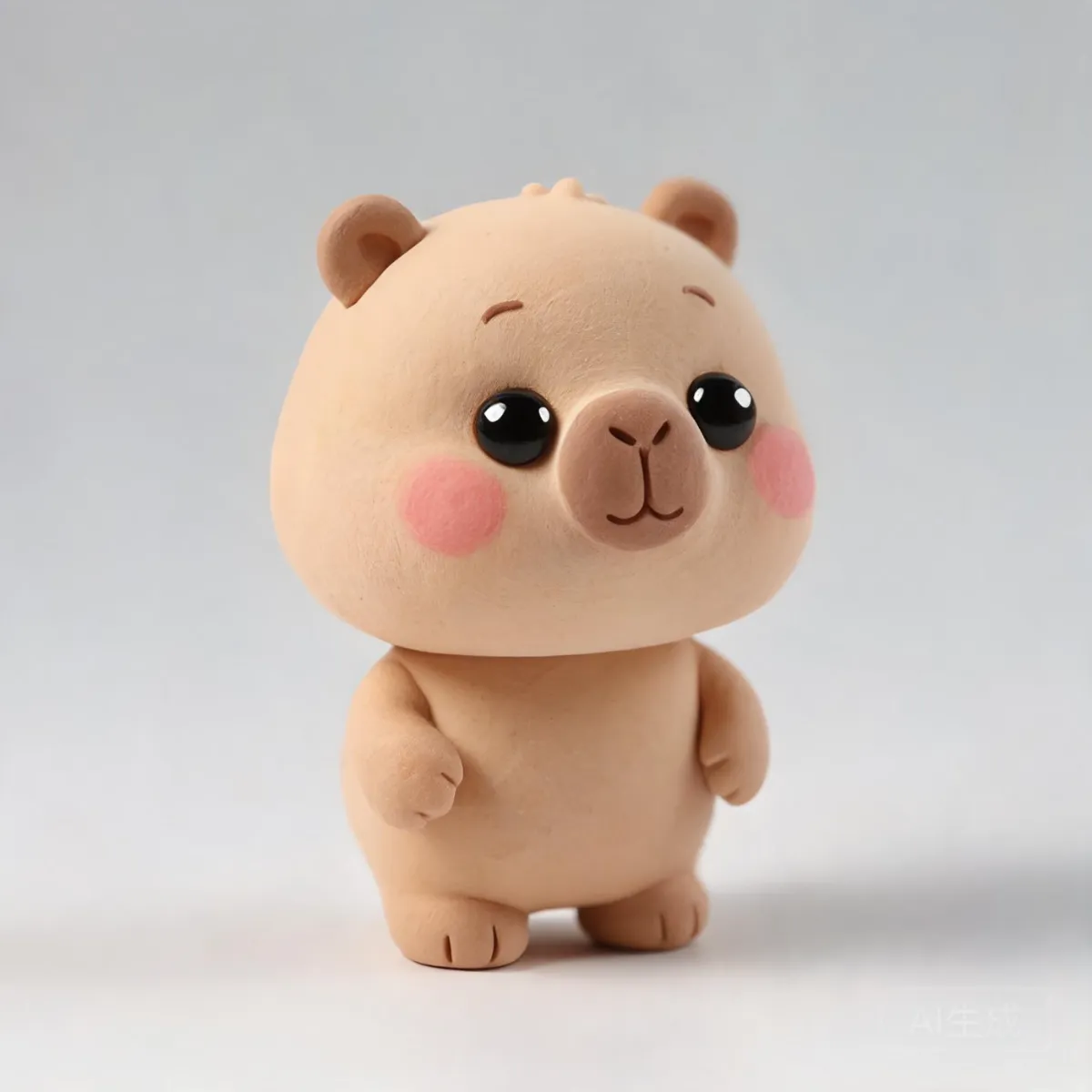
It really looks like a "product"
The surface has a subtle matte grain rather than plastic shine — that's the "soft clay render" effect. The head-to-body ratio is about 1:1.5, the eyes take up a third of the face, and it's still instantly recognizable shrunk down to a 64px avatar.
The light comes from above and slightly to the left, with soft transitional shadows under the chin and belly, so the character has real volume. The whole thing looks like a blind-box figure that's already been manufactured, not an illustration.
From one image to a full IP system
Step 1 — Lock in one "standard portrait" first. Front-facing, standing, neutral expression. This is your character baseline.
Step 2 — Use it as a reference image to generate variants. When changing expression, pose or scene, upload the standard portrait as a reference and reuse the same description (proportions, material and palette unchanged, word for word).
Step 3 — Redraw it if you want to go commercial. A generated image can be a design starting point, but trademark registration needs a clean vector mark. Have a designer trace it, and simplify the lines while they're at it — the small details in a generated image blur when scaled down.
Step 4 — Don't forget subtraction. The fewer elements on the character, the easier it is to turn into stickers, badges and toys. Three colors and two features (say, "round ears + a little tail") are enough.
After the image comes out: download, review, rework
Don't click repeatedly while you wait. This one took 31 seconds. The page shows a placeholder block or a blurry preview first, and the finished image only appears when progress completes. Clicking "Generate" again charges another 20 credits, and the two jobs queue behind each other.
Download and naming. There's a download button below the finished image, and what you get is the original at the generated size. When you save it, put the use and date in the filename (e.g. etsy-pin-2026-11-15-v1) so you don't have to dig through chat history a week later.
Three things to check. First, whether the main structure is distorted (a bottle turning into a cylinder, the wrong number of fingers, furniture floating off the floor); second, whether there are typos in any text in the image; third, whether there are dirty spots or extra props around the edges. If all three pass, you're done.
If you're not happy, change one sentence and run again. Don't rewrite the whole thing — a rewrite means a new direction and throws out all your earlier judgment. Go back to the section above, "It really looks like a 'product'," and change just one sentence the way it describes, then spend another 20 credits on one more run. Failed jobs are refunded automatically, but they are not retried automatically — you have to click again yourself.
- 20 credits per image (about $0.13 on the largest plan, up to $0.60 on the smallest), 31 seconds this time
- Generating 8 directions and picking one = 160 credits, about $1–10
- For comparison: IP character design runs $800–3,000, including three-view drawings and guidelines
- How to use it: test it on a community avatar for two weeks first, and invest in proper design once the reaction is good
Related posts
Cinematic rainy neon: an image with a story, no photographer needed
2026-11-15 · Tutorials · 5 min read
Need a product image before you've shot anything: studio-grade shot, 20 credits
2026-11-15 · Tutorials · 5 min read
Studio portrait: 85mm, soft light, real pores, no plastic look
2026-11-15 · Tutorials · 4 min read