You need a futuristic cover, but not those overused stock images
Electronic music covers, indie game concept art, tech blog headers — these images share a common formula: wet streets, neon, teal and magenta. This template spells it all out, and the character won't fall apart. 20 credits, 52 seconds.

Cyberpunk is one of AI's strongest subjects, and also one of the easiest to make tacky: either it blurs into a purple mess, or it's full of fake text, or the faces look like wax figures.
The hard part isn't the atmosphere — it's keeping the details from collapsing. Rain, signage, reflections, the character, and the buildings all need to hold their place in the same frame.
The five things in the prompt
Light: "cinematic teal and magenta lighting" — cinematic teal and magenta. This is cyberpunk's color signature; hardcoding it in the prompt is more accurate than color grading afterward.
Ground: "rain-soaked streets" — rain-soaked street surfaces. A reflective ground is the soul of this kind of image; it copies the light into the lower half of the frame.
Character: "a woman in a translucent raincoat" — one person, one translucent raincoat. Translucent materials let light through under neon, giving more depth than solid clothing.
Detail density: "ultra detailed, 2K" — it pushes up the density of detail, making signage, rain streaks, and reflections finer.
Composition: not specified, left to the model. Cyberpunk has a lot of compositional freedom; portrait orientation works better for covers.
Note that it doesn't ask for "text signage." That's smart: the model makes up whatever text goes on the signs, and what it makes up is usually gibberish — but from a distance the gibberish looks plausible, and it actually becomes part of the atmosphere.
Before you start: login and credits
Log in. Open slloy.com, click "Log in" in the top right, enter your email, and type in the 6-digit verification code. The site only supports code-based login, no password — just remember which email you used.
Credits. Generation is charged per run; this one is 20 credits (about $0.13 on the largest plan, up to $0.60 on the smallest). Your balance is in the account panel in the top right — click to open it. If your balance is too low, the page tells you directly and won't charge you for nothing.
Do you need to upload an image first? No — the prompt is complete, leave the upload box empty. Uploading an extra image only makes it harder for the model to know which one to follow.
What the interface looks like. After entering the generator, the left column from top to bottom is: image/video toggle, model (Seedream 5.0 for this one), prompt library (shows "preset loaded" — the template has already filled in the words for you), prompt input box, style presets, aspect ratio, number of images, and the generate button at the very bottom — on long pages you need to scroll down a bit to see it. The right column is the preview area and recent works.
Steps: two of them
Step 1 — Use case "Make a cover" → "Cyberpunk · City Night" → Generate this one.
Step 2 — 20 credits, generate. This time 52 seconds — slower than others in the group, because there are many elements in the frame.
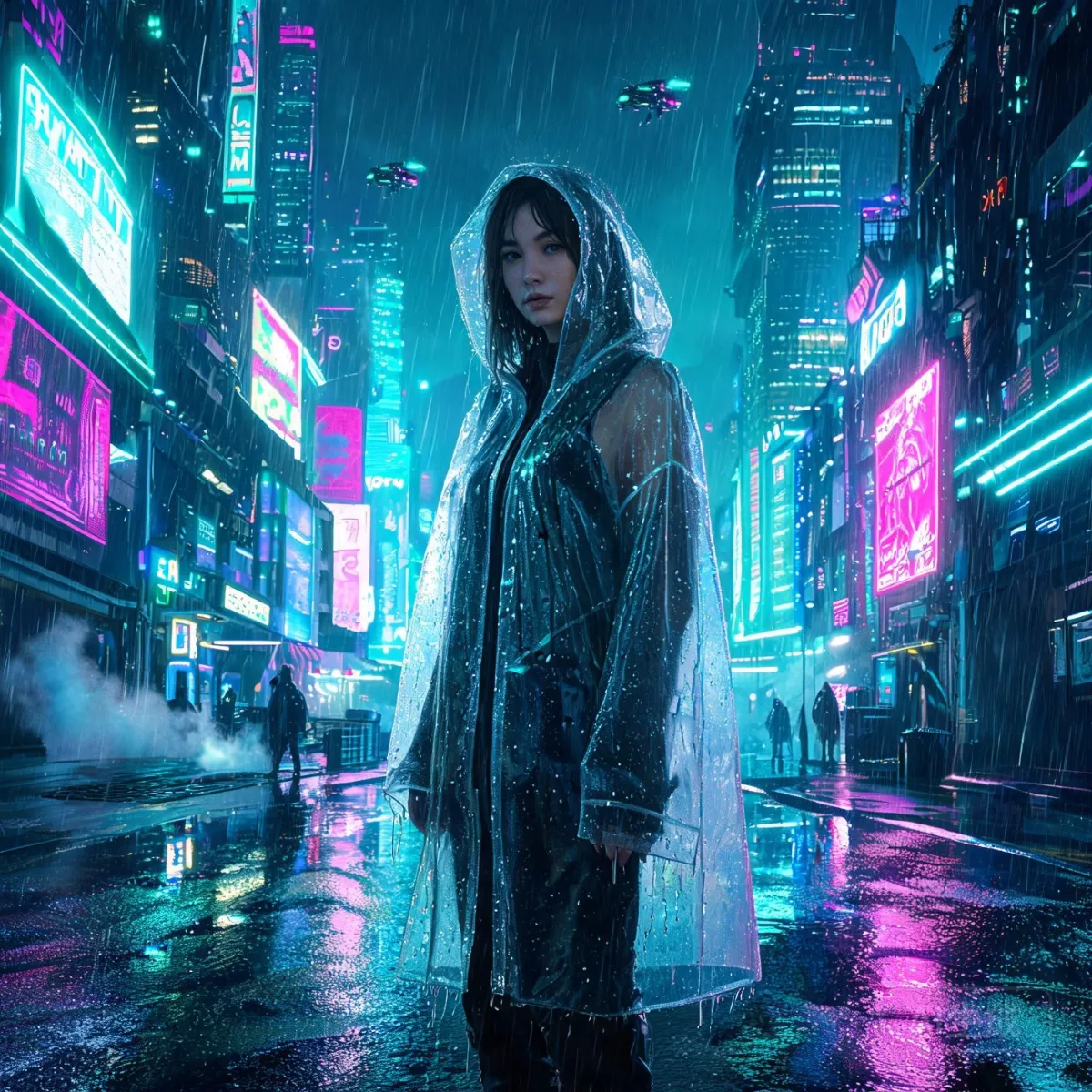
Enough atmosphere, and the person isn't blurry
The teal skylight and magenta signage don't fight each other in the same frame, and the wet street reflects both lights, so the lower half of the image has content. Detail density is high enough: rain streaks, signs, windows, and water ripples on the ground are all distinguishable, not blurred into a single color block.
The most impressive part is that the character didn't fall apart. In this kind of subject, people are the easiest to deform — crooked features, extra fingers, weird body proportions. This time the raincoat covers the body structure, and with backlighting and the rain curtain, the model doesn't have to handle complex details, so the result is actually stable.
Three directions to rewrite
Change the colors: swap "teal and magenta" for "amber and deep blue" for a warm futuristic feel, or "monochrome red" for dystopian.
Change the subject: swap the character for "a courier on a motorbike" or drop the person entirely (pure street scene) — the latter works better as an article header, since a person draws attention.
Change the aspect ratio: 9:16 for short-video covers, 16:9 for YouTube thumbnails and blog headers, 1:1 for music album covers.
One reminder: don't add a string of stacked words like "cyberpunk style, neon, futuristic, 8k, masterpiece." The prompt already says everything it needs to; stacking words only makes the image dirtier.
After the image comes out: download, review, rework
Don't click repeatedly while waiting. This one takes 52 seconds. The page shows a placeholder block or blurry preview first; the finished image appears only when progress completes. Clicking "Generate" again charges another 20 credits, and the two tasks queue behind each other.
Download and naming. There's a download button below the result; what you get is the original image at the generated size. When saving, put the use case and date in the filename (e.g. etsy-pin-2026-11-15-v1) so you don't have to dig through chat history a week later.
Three things to check. First, whether the main structure is deformed (bottle turned into a cylinder, wrong number of fingers, furniture floating off the ground); second, whether there are typos in the text in the image; third, whether there are dirty spots or extra props at the edges. If all three pass, you don't need to touch it again.
If you're not satisfied, change one sentence and run again. Don't rewrite the whole thing — rewriting means changing direction, and all your earlier judgment is wasted. Go back to the "Enough atmosphere, and the person isn't blurry" section above, change only one sentence according to the method described there, and spend another 20 credits on one more run. Failed tasks are refunded automatically, but won't retry automatically — you need to click again yourself.
- 20 credits per image (about $0.13 on the largest plan, up to $0.60 on the smallest), 52 seconds this time
- One album cover with 4 directions = 80 credits
- For comparison: outsourced concept design is $150–500 per image
- Good for: music covers, game concept art, tech/crypto article headers, event poster backgrounds
Related posts
Cinematic rainy neon: an image with a story, no photographer needed
2026-11-15 · Tutorials · 5 min read
Need a product image before you've shot anything: studio-grade shot, 20 credits
2026-11-15 · Tutorials · 5 min read
Studio portrait: 85mm, soft light, real pores, no plastic look
2026-11-15 · Tutorials · 4 min read