Flat illustration is the most usable kind of "image you can print"
Photos blur when blown up to poster size; illustrations don't. This template uses layered buildings, long shadows and a wide stretch of blank sky to build a travel-poster layout — the headline sits right on the sky. 20 credits, 48 seconds.

When you're making posters, blog headers or POD prints (tote bags, postcards, decorative art), photos often don't work: too much detail, too many colors, blurry when enlarged.
Flat illustration has the opposite strengths: big color blocks, clean edges, lots of negative space, no loss when scaled up. Hiring an illustrator for one piece runs $150–400, and revisions mean waiting in line.
Four layout decisions in the prompt
"Flat vector illustration" — flat vector illustration. This phrase sets the entire visual language that follows: no gradients, no textures, no light-and-shadow transitions.
"layered buildings in coral and mustard" — layered buildings in coral and mustard. Layering is the key: foreground, midground and background use different values, which is what gives a flat image depth.
"long shadows" — long shadows. Low-angle golden-hour light stretches the shadows out. This one touch gives the flat plane a sense of time.
"travel-poster composition" — travel-poster composition. This phrase brings out the classic layout of "large sky + subject below," which is where the negative space comes from.
In testing, "a large blank sky you can put a headline on directly" is the most practical part of this template: no cropping, no color-block padding — the headline just sits on top.
Before you start: login and credits
Log in. Open slloy.com, click "Log in" in the top right, enter your email, and type in the 6-digit verification code. The site only supports code-based login, no password — just remember which email you used.
Credits. Generation is charged per run; this one is 20 credits (about $0.13 on the largest plan, up to $0.60 on the smallest). Your balance is in the account panel in the top right — click to open it. If the balance is too low, the page tells you directly, so you won't be charged for nothing.
Do I need to upload an image first? No — the prompt is complete as written, so leave the upload box empty. Uploading an extra image only makes it harder for the model to tell which one to follow.
What the interface looks like. Once you're in the generator, the left column from top to bottom is: image/video toggle, model (Seedream 5.0 for this one), prompt library (shows "preset loaded" — the template has already filled in the words for you), prompt input box, style presets, aspect ratio, number of images, and the generate button at the very bottom — on a long page you may need to scroll down a bit to see it. The right column is the preview area and recent works.
Steps: two of them
Step 1 — Use case "Make a cover" → "Flat · Vector illustration" → Generate this one.
Step 2 — 20 credits, generate. This run took 48 seconds. For a vertical poster, choose 2:3; for a horizontal header, choose 16:9.
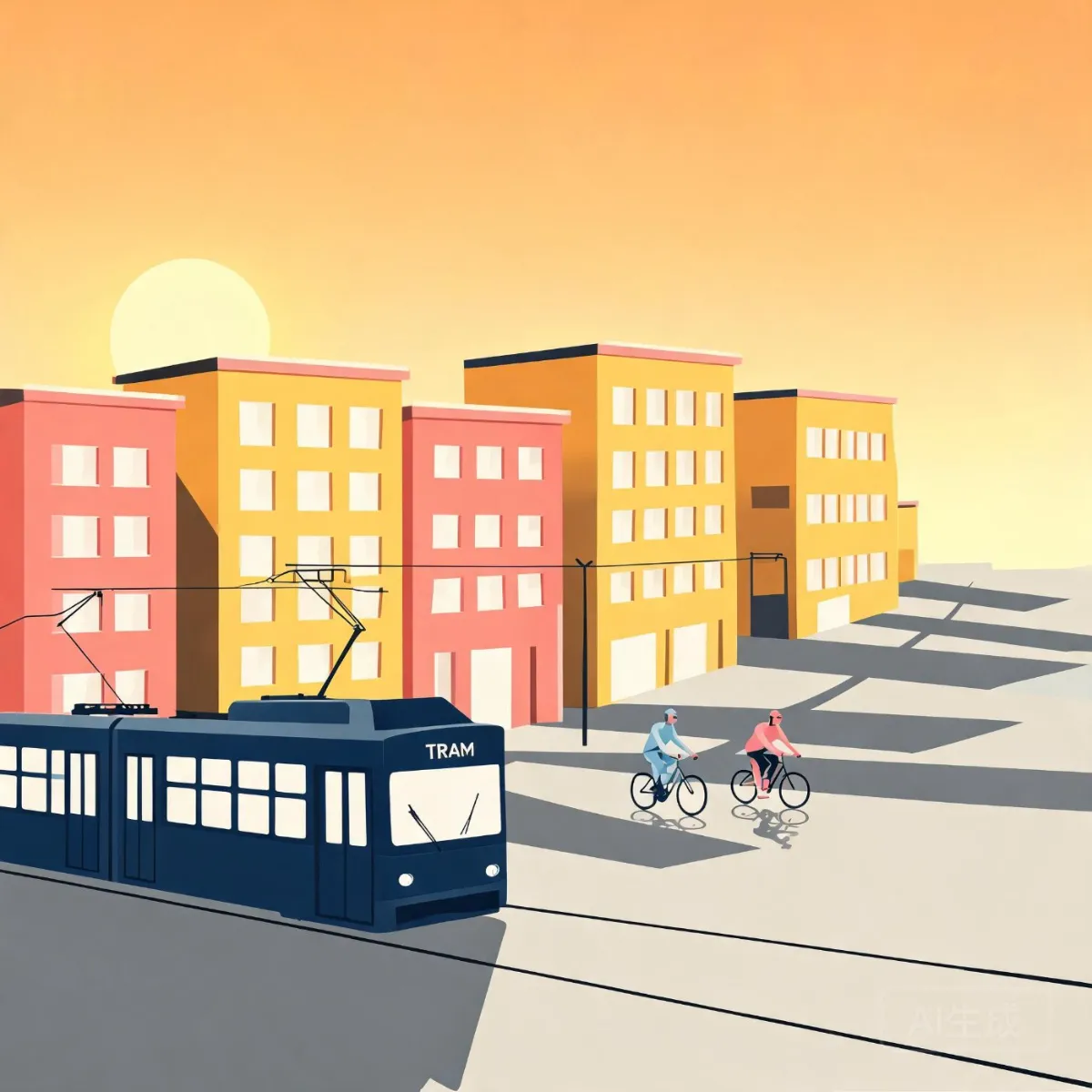
Clean enough to lay out text on directly
The sky takes up a big block across the top of the image, with even color and no clutter — a line of bold headline plus a line of small subtitle fits perfectly. The buildings are layered: darker up close, lighter in the distance, so the flat image reads as having depth. The long shadows stretch from right to left, fixing the time of day — evening.
The color-block edges are clean, with none of the smeared edges and noise that give AI images away. Scaled down to thumbnail size, it still reads instantly as a street scene.
Two things to watch for when printing
1. It's a raster image, not a vector. Above 24×36 inches you'll see the edges start to fuzz. For real printing, export it and run Image Trace in Illustrator, then clean up the anchor points.
2. Color gamut. The coral red on screen prints darker, and often goes gray after CMYK conversion. Before printing, bump saturation 5–10%, or just pick the closest PANTONE match.
Also: this template's composition is especially friendly for "horizontal headers" — treat the sky area as the title zone, and you don't need to crop the body image again.
After the image comes out: download, check, redo
Don't click repeatedly while you wait. This run took 48 seconds. The page shows a placeholder block or blurry preview first, and the finished image only appears when progress completes. Clicking "Generate" again charges another 20 credits, and the two jobs queue behind each other.
Download and naming. There's a download button below the finished image; what you get is the original at the generated size. When you save it, put the use and date in the filename (e.g. etsy-pin-2026-11-15-v1) so you don't have to dig through chat logs a week later.
Three things to check. One, whether the main structure is distorted (a bottle turned into a cylinder, the wrong number of fingers, furniture floating off the floor); two, whether any text in the image has typos; three, whether there are dirty spots or extra props at the edges. If all three pass, leave it alone.
If you're not happy, change one sentence and run again. Don't rewrite the whole thing — a rewrite means a new direction, and all your earlier judgment is wasted. Go back to the "Two things to watch for when printing" section above and change just one sentence the way it describes, then spend another 20 credits on a run. Failed jobs are refunded automatically, but they are not retried automatically — you have to click again yourself.
- 20 credits per image (about $0.13 on the largest plan, up to $0.60 on the smallest), 48 seconds this time
- Three versions per city (horizontal/vertical/square) = 60 credits, covering headers, posters and social media
- For comparison: an illustrator charges $150–400 per piece, with 2–3 rounds of revisions
- Good for: travel/city-themed posters, blog headers, POD postcards and decorative art, event visuals
Related posts
Cinematic rainy neon: an image with a story, no photographer needed
2026-11-15 · Tutorials · 5 min read
Need a product image before you've shot anything: studio-grade shot, 20 credits
2026-11-15 · Tutorials · 5 min read
Studio portrait: 85mm, soft light, real pores, no plastic look
2026-11-15 · Tutorials · 4 min read