The same face needs three versions: window light, golden hour, and cool studio
For personal branding, instructor pages, and podcast guest intros, the same face needs to match different emotional lighting. Reshooting three times isn't realistic — relighting takes just one upload. This template changes only the light; not a single pixel of the facial features may move. 20 credits, 53 seconds.

In a single year, a person may need to hand over photos from five different settings: a neutral studio shot for the company website, warm tones for a podcast cover, natural window light for a course page, a clean frontal shot for LinkedIn, and a decisive hard-lit profile for a pitch deck.
Reshooting for every new context costs more than money — it costs time and state. You may never again capture the face you had that afternoon.
The way this prompt is written is worth copying down separately
It starts with an overarching principle: "changing only the light on the subject and nothing about the person" — change only the light falling on the person; everything about the person stays the same.
Then it breaks "unchanged" into a checklist: eye position and gaze direction, hairline and every stray hair along the edges, moles, freckles, scars, jawline, ear shape — must not be moved, blurred, or smoothed away. The more specific this list is, the less the model dares to cut corners.
Then come three prohibitions: do not reshape the face, do not make the person fatter or thinner, do not repaint skin texture, do not add or remove makeup.
Only at the end comes "how to light it": one key direction, skin tone and clothing color temperature consistent, soft falloff, one believable specular highlight in each eye, and the old shadows must be cleanly removed — no double shadows left behind.
"One believable specular highlight in each eye" — this is a professional-grade detail. The position and size of the catchlight directly determine whether a photo looks like "someone took it" or "something painted it."
Before you start: login and credits
Log in. Open slloy.com, click "Log in" in the top right, enter your email, and type in the 6-digit verification code. The site only supports verification-code login — no passwords. Just remember which email you used.
Credits. Generation is charged per run; this one costs 20 credits (about $0.13 on the largest plan, up to $0.60 on the smallest). Your balance is in the account panel in the top right — click to open it. If your balance is insufficient, the page will tell you directly; you won't be charged for nothing.
Do you need to upload an image first for this one? Yes — this is a "keep the original image, change only one thing" template. Without an upload, you'll get a product the model made up, and credits are still deducted. There's a reference image upload slot in the left column; just drag your photo in.
What the interface looks like. After entering the generator, the left column from top to bottom is: image/video toggle, model (Seedream 5.0 for this one), prompt library (shows "preset loaded" — the template has already filled in the words for you), prompt input box, style presets, aspect ratio, number of images, and at the very bottom the generate button — on longer pages you may need to scroll down a bit to see it. The right column is the preview area and recent works.
Steps: one frontal photo + one sentence describing the light
Step 1 — Use case "retouch a headshot" → "portrait relighting" → generate the same.
Step 2 — Upload a frontal photo with both eyes visible and not too dark. Fill {person} with the person ("a woman with curly hair and freckles across the bridge of her nose and both cheeks"), and {lighting} with the light ("warm light coming through a window on the left, soft, with a bit of directionality").
Step 3 — 20 credits, generate. This time: 53 seconds.
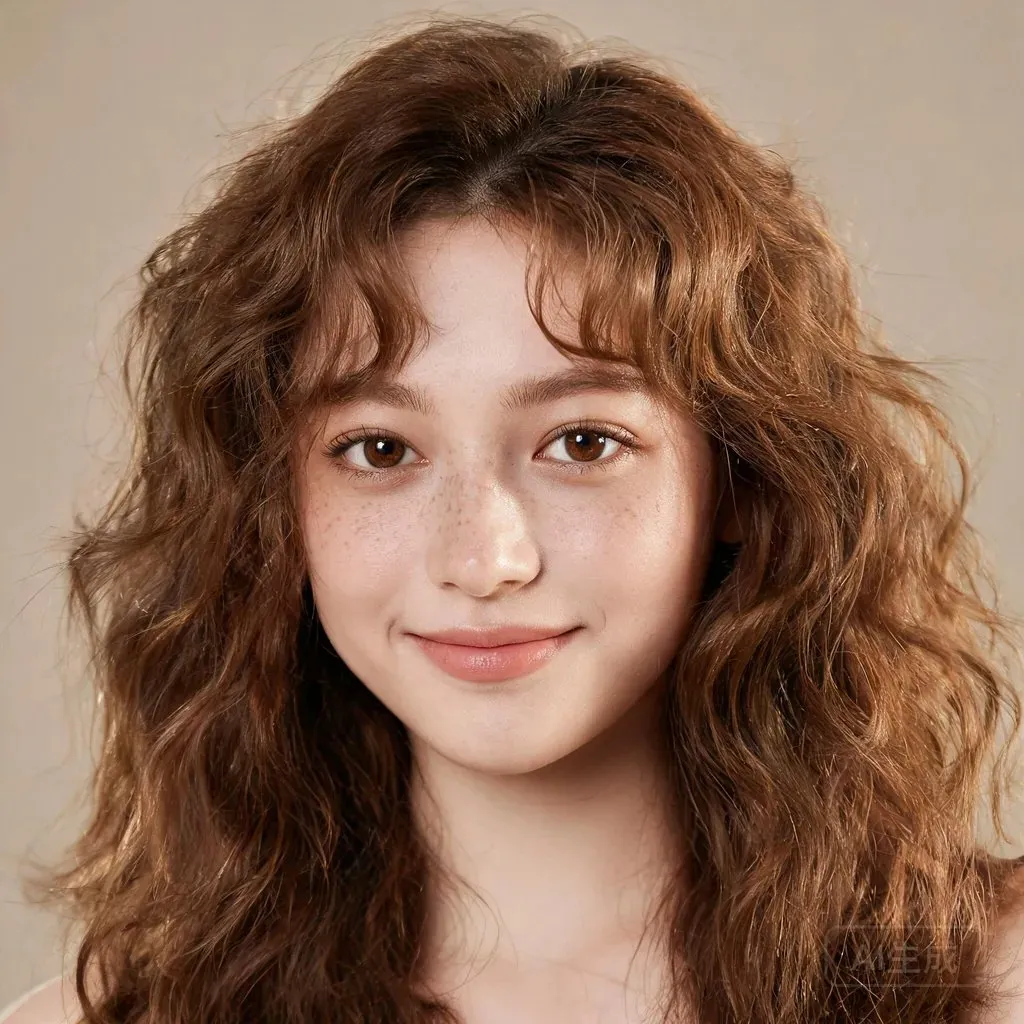
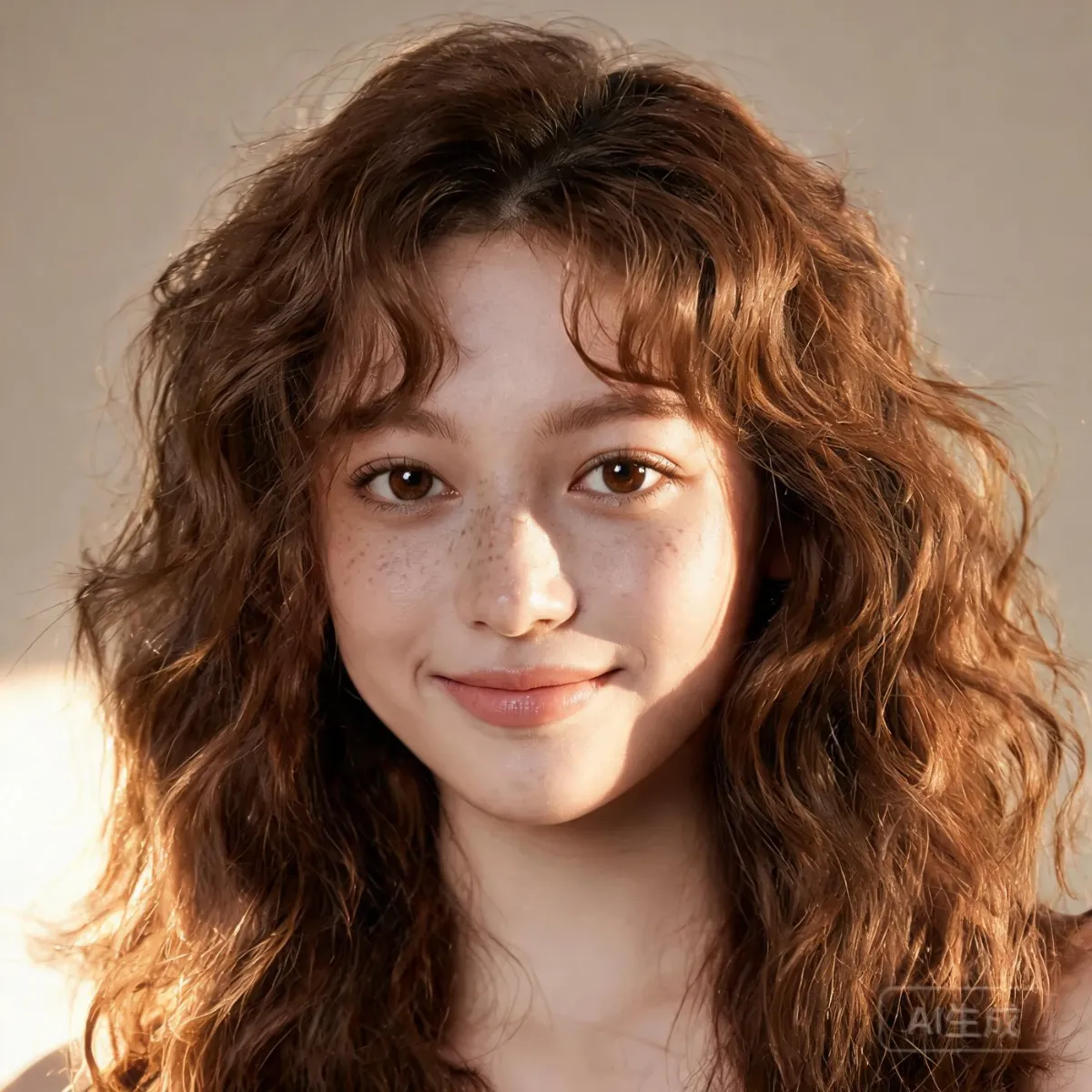
Placeholder copy-paste table
The template uses curly braces to mark blanks — 2 in total, all of which you need to replace with your own content. Leave them unfilled and the model will make something up. The right column has sentences you can paste in directly — get it running first, then modify.
Change the light, and the person is still the same person
The originally flat overhead light was replaced with a beam of warm light from the left: a bright band on the nose bridge, the left cheek lifted, the right side of the face falling into shadow but not crushed to black, and a bit of ambient light filling back in at the collarbone. The sense of three-dimensionality comes through immediately.
The key is that the face hasn't changed: not one freckle missing, none moved; the stray hairs along the hairline are still there; eye shape, jawline, and ear shape all match; the skin has visible pores — not plastic.
This is the most impressive thing about this template — what it does is not "beautify," it's "relight." The results of those two things are very different.
Three acceptance checks
Step 1 — Zoom in on the eyes, hairline, and moles. These three areas must be identical to the original. If any one of them has been "optimized," the image is no longer this person.
Step 2 — Check the neck for double shadows. If the old shadows weren't cleaned up, the old and new lighting will overlap into a strange double shadow. Lower the new light intensity and rerun, or narrow {lighting} down to a single direction.
Step 3 — Check the catchlights. Each eye should have one highlight, consistent in position and reasonable in size. If one is missing, or the two positions conflict, the photo instantly looks fake.
One more thing: don't make the lighting position jump too far in one go. The original shadow structure is already etched into the face; going straight from overhead light to side-backlight can easily distort the face shape. If the jump is large, first run an intermediate light position, then push toward the target.
After the image comes out: download, acceptance, rework
Don't click repeatedly while waiting. This time it's 53 seconds. The page will first show a placeholder block or a blurred preview; the finished image appears only after progress completes. Clicking "Generate" again deducts another 20 credits, and the two tasks will queue behind each other.
Download and naming. There's a download button below the finished image; what you get is the original at the generated size. When saving, put the use case and date in the filename (e.g. etsy-pin-2026-11-15-v1) so you don't have to dig through chat history a week later.
Three acceptance checks. First, whether the subject's structure is distorted (bottle turned into a cylinder, wrong number of fingers, furniture floating off the ground); second, whether there are typos in any text in the image; third, whether there are dirty spots or extra props at the edges. If all three pass, you don't need to touch it again.
If you're not satisfied, change one sentence and rerun. Don't rewrite the whole thing — rewriting means changing direction, and all your earlier judgment is wasted. Go back to the "Three acceptance checks" section above and change only one sentence according to the fix described there, then spend another 20 credits on one more run. Failed tasks are automatically refunded, but they are not automatically retried — you need to click again yourself.
Cost
- 20 credits per image (about $0.13 on the largest plan, up to $0.60 on the smallest), 53 seconds this time
- One person with three lighting setups (window light / warm / cool studio) = 60 credits
- For comparison: a reshoot costs $150–400, plus makeup and location
- What this saves most isn't money — it's "not having to book another shoot"
Related posts
Cinematic rainy neon: an image with a story, no photographer needed
2026-11-15 · Tutorials · 5 min read
Need a product image before you've shot anything: studio-grade shot, 20 credits
2026-11-15 · Tutorials · 5 min read
Studio portrait: 85mm, soft light, real pores, no plastic look
2026-11-15 · Tutorials · 4 min read