Handmade products are missing one thing: a label that looks legit
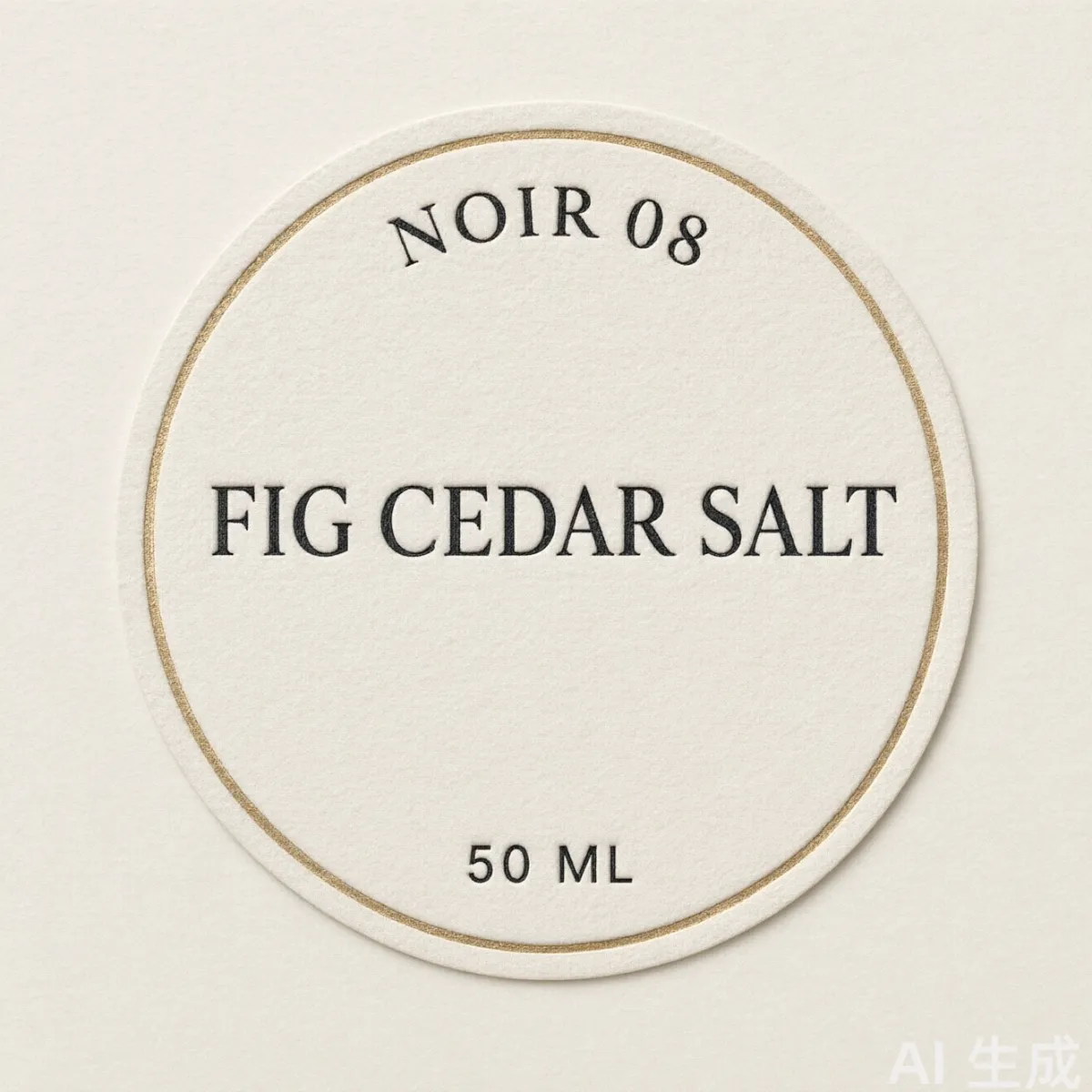
Candles, jam, essential oils, soap — for small-batch products, the label decides whether it looks like $8 or $25 at the market. This template produces a circular layout: brand name along the arc, scent in the middle, volume at the bottom. 20 credits, 82 seconds.

Label design usually has a 500-piece minimum order, plus $80–250 for design on top. If you're only making 50 bottles for a test run, that's too much to sink in.
Off-the-shelf templates mean everyone at the market is using the same set. And if you lay it out yourself in Word, you can't do curved text at all — that takes professional software and a bit of skill.
The prompt breaks the label into four layers of information
Material: "printed on {material}" — kraft paper, matte white, clear vinyl. Material sets the mood: kraft = handmade, matte white = modern, clear = fresh.
Top arc: "the brand name {brand} curved along the top edge", plus "Keep the type on the arc short so the letters do not scatter" — the text on the arc has to be short, or the letters will scatter.
Center and bottom: "{scent} in the centre, {size} at the bottom". The middle holds the product name or scent, the bottom holds the volume. This is the classic three-tier structure of perfume/essential oil labels.
Texture: "letterpress texture with a slight ink impression" — the debossed impression of letterpress. This one line makes the label look printed rather than printed out.
Prohibitions: no barcode, no QR code, no ingredient list, no watermark.
Why ban the ingredient list? Because small text always turns to mush. Ingredient lists on labels need real layout software; AI-generated small text becomes a gray blur.
Before you start: login and credits
Log in. Open slloy.com, click "Log in" in the top right, enter your email, and type in the 6-digit code you receive. The site only does code-based login, no password — just remember which email you used.
Credits. Generation is charged per run; this one is 20 credits (about $0.13 on the largest plan, up to $0.60 on the smallest). Your balance is in the account panel in the top right — open it to see. If you're short, the page tells you directly and won't charge you for nothing.
Do you need to upload an image first? No — the prompt is complete on its own, so leave the upload box empty. Adding an extra image just makes it unclear which one the model should follow.
What the interface looks like. Once you're in the generator, the left column from top to bottom is: image/video toggle, model (this one is Qwen-Image), prompt library (shows "preset loaded" — the template has filled in the words for you), prompt input box, style presets, aspect ratio (1:1 by default), number of images, and at the very bottom the generate button — on a long page you may need to scroll down a bit to see it. The right column is the preview area and recent works.
Steps: fill in six blanks
Step 1 — Use case "brand assets" → "small-batch product label" → generate the same.
Step 2 — Fill in: material, product, brand name, scent/product name, volume, accent color.
Step 3 — 1:1, 20 credits, generate. This run took 82 seconds.
Placeholder copy sheet
The template has 6 blanks wrapped in curly braces, and you need to replace all of them with your own content — leave them unfilled and the model will make something up. The right column has sentences you can paste in directly; get it running first, then tweak.
All three text positions came out right
The brand name runs along the top arc, every letter upright and evenly spaced, with no "cramped at the ends" or upside-down letters — that's where curved typesetting usually falls apart. The product name in the middle and the volume at the bottom are also correct, with a clear size hierarchy.
The kraft paper fiber texture and the slight letterpress impression are both there; the whole thing looks like a sticker that's already been printed, not a flat design mockup.
Four things before printing
Step 1 — If the brand name is long, switch to a straight line. The more text on the arc, the more likely it scatters. If the name is over 12 characters, change "curved along the top edge" to "set in a straight line across the top".
Step 2 — Make the barcode separately. Model-drawn barcodes won't scan. Generate one with a real encoder, or buy ready-made label stickers.
Step 3 — Confirm the die cut. A circular label needs a circular die; tell the printer the diameter and bleed (usually 2–3 mm).
Step 4 — Upscale before printing. Enlarge the generated image to 300dpi or higher for cleaner edges. Below that, it'll look soft in print.
Bonus: you can swap colorways to build a product line from the same label — one layout, three scents, three accent colors, at the cost of just three generations.
After the image comes out: download, check, redo
Don't click repeatedly while you wait. This run took 82 seconds. The page shows a placeholder block or blurry preview first; the finished image only appears when progress completes. Clicking "Generate" again charges another 20 credits, and the two jobs queue behind each other.
Download and naming. There's a download button below the finished image; what you get is the original at generation size. Put the use and date in the filename (e.g. etsy-pin-2026-11-15-v1) so you don't have to dig through chat logs a week later.
Three checks. One, is the main structure distorted (bottle turned into a cylinder, wrong number of fingers, furniture floating off the floor); two, are there typos in the text in the image; three, are there dirty spots or extra props at the edges. If all three pass, leave it alone.
If you're not happy, change one sentence and run again. Don't rewrite the whole thing — a rewrite means a new direction and throws out all your earlier judgment. Go back to the "All three text positions came out right" section above and change just one sentence the way it describes, then spend another 20 credits on one more run. Failed jobs are refunded automatically, but they do not retry automatically — you have to click again yourself.
- 20 credits per image (about $0.13 on the largest plan, up to $0.60 on the smallest), 82 seconds this run
- A product line of 3 SKUs = 60 credits
- For comparison: label design $80–250, printing 500 labels $60–150
- Good for: candles, jam, essential oils, soap, tea, small-batch skincare
Related posts
Cinematic rainy neon: an image with a story, no photographer needed
2026-11-15 · Tutorials · 5 min read
Need a product image before you've shot anything: studio-grade shot, 20 credits
2026-11-15 · Tutorials · 5 min read
Studio portrait: 85mm, soft light, real pores, no plastic look
2026-11-15 · Tutorials · 4 min read