Printable Journal Pages: A PDF Set Sells for $3–12, and the Only Cost Is Design
"printable journal pages" is a steady category on Etsy: buyers print and bind the pages themselves. The hard part is the inner-page layout — the rules have to be even, the binding side needs a margin, and decoration must not crowd the text. This template gets it right in one pass. 20 credits, 43 seconds.

Journal inner pages look simple, but they're full of traps: uneven rule spacing, inconsistent line heights, decoration crowding the writing area, and no margin on the binding side so punched holes cut through the text.
Lay it out in Word and the line spacing is always half a pixel off; use design software and ten different page types take a whole day.
The prompt turns the layout into rules
Writing area: "a writing area that takes up roughly two thirds of the page, ruled with evenly spaced horizontal lines of consistent weight". Two thirds of the page, evenly spaced rules, consistent line weight.
Binding side: "a wide blank margin on the binding side for a date line or punched holes". A wide blank margin on the binding side for a date line or punched holes.
Decoration top and bottom only: "Keep decoration in the top and bottom bands only so nothing breaks a line of handwriting". Decoration stays in the top and bottom bands only and must not break a line of handwriting.
Print-friendly: "white paper, one accent ink plus black line work, no heavy fills, no gradients, no drop shadows, no page numbers, no brand marks". White paper, one accent ink plus black line work, no heavy fills, no gradients, no drop shadows, no page numbers, no brand marks.
Crispness: "Lines must stay crisp and evenly spaced edge to edge, so the page still reads as printed rather than photocopied at A5 and A4". Lines must stay crisp, evenly spaced, and run edge to edge, so the page reads as printed rather than photocopied at A5 and A4.
"no page numbers" — because buyers print and bind the pages themselves, so page numbers depend on print order; baking them into the image only causes trouble.
Before you start: sign-in and credits
Sign in. Open slloy.com, click "Sign in" in the top right, enter your email, and type in the 6-digit verification code. The site only supports code-based sign-in, with no password — just remember which email you used.
Credits. Generation is charged per run; this one is 20 credits (about $0.13 on the largest plan, up to $0.60 on the smallest). Your balance is in the account panel in the top right — open it to see it; if the balance is too low the page tells you directly, so you're never charged for nothing.
Do you need to upload an image first? No — the prompt is complete on its own, so leave the upload box empty. Uploading an extra image only makes it unclear which one the model should follow.
What the interface looks like. Once you're in the generator, the left column from top to bottom is: image/video toggle, model (Seedream 5.0 for this one), prompt library (shows "preset loaded" — the template has already filled in the wording for you), prompt input box, style presets, aspect ratio (2:3 by default), number of images, and the generate button at the very bottom — on a long page you may need to scroll down a little to see it. The right column is the preview area and recent works.
Doing it: fill in two blanks
Step 1 — Use case "make a printable image" → "journal inner pages you can actually write on" → generate the same.
Step 2 — Fill {theme} with the theme ("monthly planner"), and {motif} with the decoration ("twigs and small flowers").
Step 3 — 2:3, 20 credits, generate. This run took 43 seconds.
Placeholder cheat sheet
The spots wrapped in curly braces in the template are blanks — 2 in total, all of which you need to replace with your own content. Leave them unfilled and the model will make something up. The right column has sentences you can paste straight in; get it working first, then change them.
Ready to print and bind
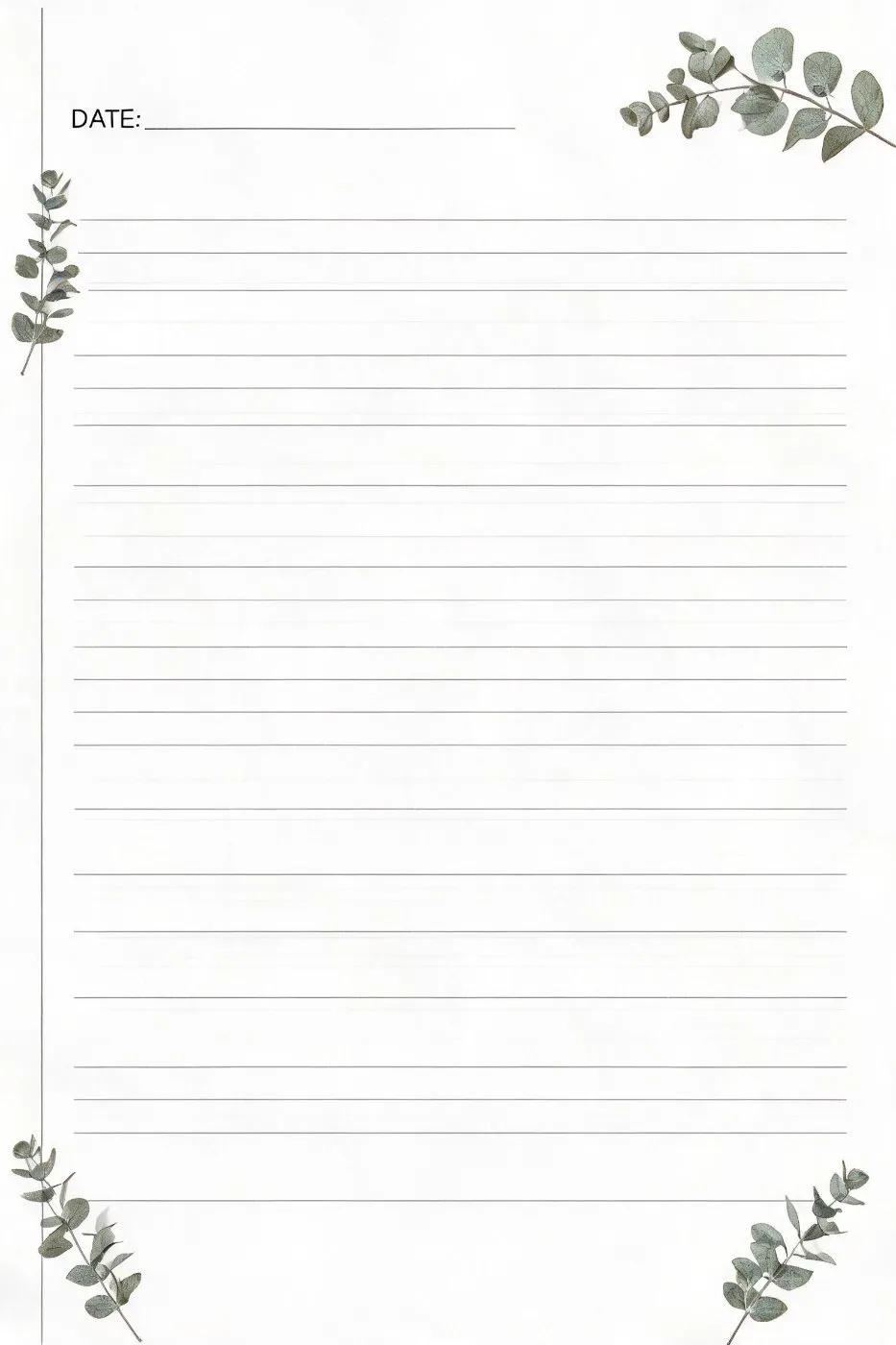
The rules are evenly spaced with consistent line weight, running all the way from the left edge to the right; the binding-side margin is wide, so punched holes won't touch the text; small leafy sprigs sit at the top and bottom, outside the writing area, so they don't break any line.
The palette is restrained: black line work plus one low-saturation accent color. It prints cleanly on ordinary A4 paper and won't curl from heavy ink coverage.
Three things before you batch print
Step 1 — Print one sample first. The rules may drift by a pixel or two across the sheet; if the sample is uneven, rerun it — don't force-print a whole notebook.
Step 2 — Don't trim off the binding side. That blank margin is where the holes and binding go; trim it off and the whole page is ruined.
Step 3 — Make both A5 and A4 versions. A5 is the notebook size, A4 is the printer-paper size. Scaling the same image to both sizes changes the line spacing, so it's best to generate or re-lay-out each separately.
Productizing it: a set of 8–12 pages (monthly, weekly planner, habit tracker, reading log, blank grid) packaged as a PDF sells for $3–12 on Etsy. The cost is 8 generations, about $1–5.
- 20 credits per page (about $0.13 on the largest plan, up to $0.60 on the smallest), 43 seconds this run
- A 10-page set = 200 credits, about $1.3–12; sell at $3–12 a set and ten sales cover the cost
- For comparison: outsourced journal page design runs $10–30 a page
- Note: when selling digital downloads, state the usage restrictions clearly in the listing (personal use / no resale)
After the image comes out: download, check, rework
Don't click repeatedly while you wait. This run took 43 seconds. The page shows a placeholder block or blurry preview first, and the finished image appears once progress completes. Clicking "generate" again charges another 20 credits, and the two jobs queue behind each other.
Download and naming. There's a download button below the finished image, and what you get is the original at the generated size. Put the use and date in the filename when you save it (e.g. etsy-pin-2026-11-15-v1) so you don't have to dig through chat logs a week later.
Three things to check. First, whether the main structure is distorted (a bottle turned into a cylinder, the wrong number of fingers, furniture floating off the floor); second, whether any text in the image has typos; third, whether there are dirty spots or extra props at the edges. If all three pass, you're done.
If you're not happy, change one sentence and rerun. Don't rewrite the whole thing — a rewrite means a new direction and throws out all your earlier judgment. Go back to the "Ready to print and bind" section above and change just one sentence the way it describes, then spend another 20 credits on a run. Failed jobs are refunded automatically, but they are not retried automatically — you need to click again yourself.
Related posts
Cinematic rainy neon: an image with a story, no photographer needed
2026-11-15 · Tutorials · 5 min read
Need a product image before you've shot anything: studio-grade shot, 20 credits
2026-11-15 · Tutorials · 5 min read
Studio portrait: 85mm, soft light, real pores, no plastic look
2026-11-15 · Tutorials · 4 min read