One Pet Photo, Turned Into an Oil Painting
Pet portraits are a steady business in the US: hand-painted oil paintings at $150–500, with a four-week wait. This template turns a photo into an oil painting without changing the breed, coat color, or markings. 20 credits, 36 seconds—the cost structure of the gift business has completely changed.

Pet memorials, birthday gifts, memorial paintings of pets that have passed—this market demand is real, and the average order value is not low.
The barrier is hand painting: a pet portrait artist quotes $150–500 and books a month out or more. To take orders, you first have to know how to paint.
The prompt has two halves: one sets the style, one locks the identity
The style half: "An oil portrait... painted in {style}... Painterly brushwork with visible strokes, warm chiaroscuro light, canvas texture, museum-quality rendering." Visible brushwork, warm chiaroscuro, canvas texture, museum-quality—four terms that lock in "oil painting" rather than "photo with a filter."
The identity half: "Keep the breed, coat colour, markings, eye colour and ear shape exactly as photographed — leg length, tail shape and the position of every patch must stay true to the reference." Breed, coat color, markings, eye color, ear shape, plus leg length, tail shape, and the position of every patch of color.
Why is this sentence so detailed? Because whether a pet "looks like" itself comes down to these details. The owner can tell at a glance that "this isn't my cat."
"Give it a soft contact shadow so it sits on a surface rather than floating"—add a contact shadow so it looks like it's "sitting on the ground" rather than floating in the middle of the canvas. This detail determines whether the result looks like a formal portrait.
Before you start: login and credits
Log in. Open slloy.com, click "Log in" in the top right, enter your email, and enter the 6-digit verification code. The site only supports verification-code login, with no password—just remember which email you used.
Credits. Generation is charged per run; this one costs 20 credits (about $0.13 on the largest plan, up to $0.60 on the smallest). Your balance is in the account panel in the top right—open it to see it. If your balance is insufficient, the page will tell you directly and won't charge you for nothing.
Does this one need an image upload first? Yes—it's a "keep the original image, change only one thing" template. Without an upload, you'll get a product the model made up, and credits are still charged. There's a reference image upload slot in the left column; just drag your photo in.
What the interface looks like. After entering the generator, the left column from top to bottom is: image/video toggle, model (Seedream 5.0 for this one), prompt library (shows "preset loaded"—the template has already filled in the words for you), prompt input box, style presets, aspect ratio (default 1:1), number of images, and at the very bottom the generate button—on longer pages you may need to scroll down a bit to see it. The right column is the preview area and recent works.
Steps: one photo, three blanks
Step 1 — Use case "Retouch a headshot" → "Pet oil portrait" → Generate the same.
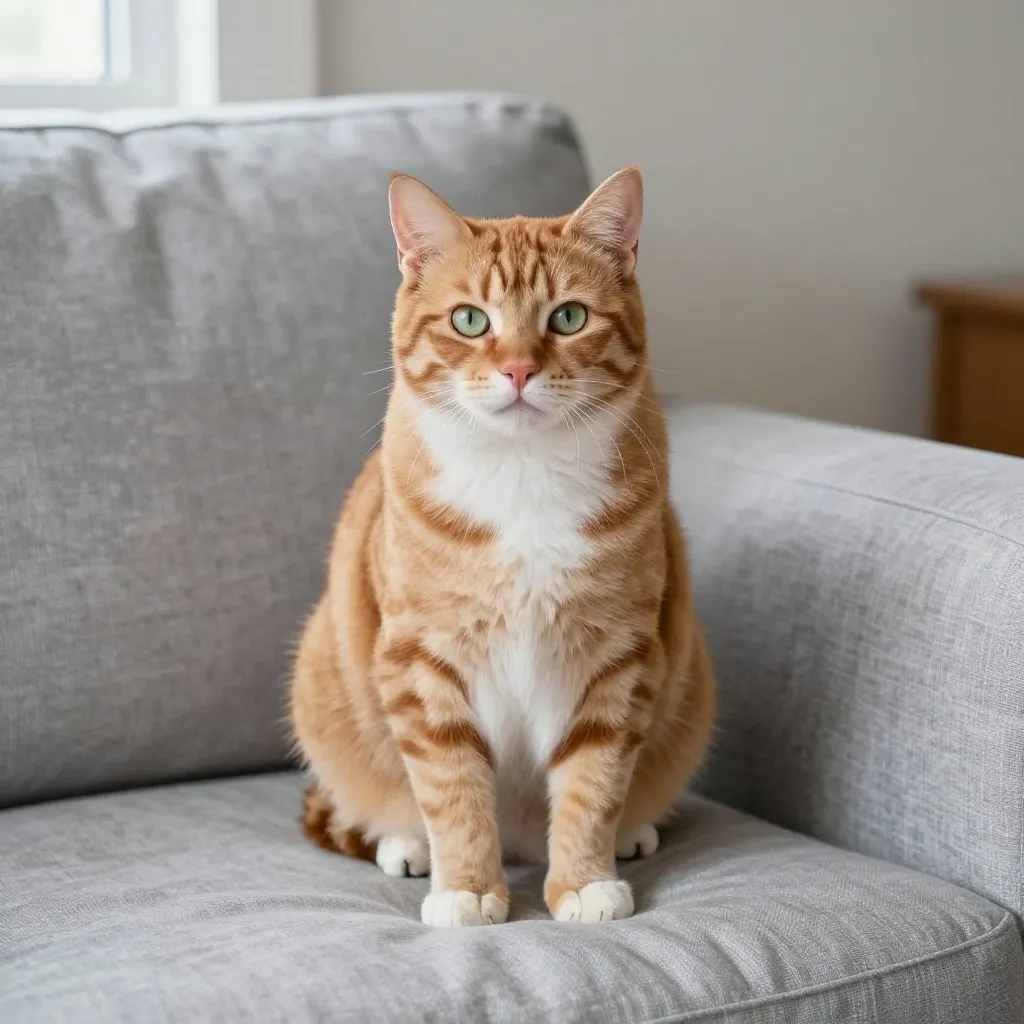
Step 2 — Upload a front-facing photo of your pet (whole head in frame, natural light, nothing covering the face). Fill {animal} with the animal ("an orange tabby cat"), {style} with the art style ("classical realistic oil painting, Rembrandt lighting"), and {backdrop} with the background ("deep forest-green velvet").
Step 3 — 1:1, 20 credits, generate. This time it took 36 seconds.
Placeholder copy sheet
The template has 3 blanks wrapped in curly braces, and all of them need to be replaced with your own content—if you leave them unfilled, the model will make something up. The right column has sentences you can copy in directly; get it running first, then edit.
Same cat, and also a painting
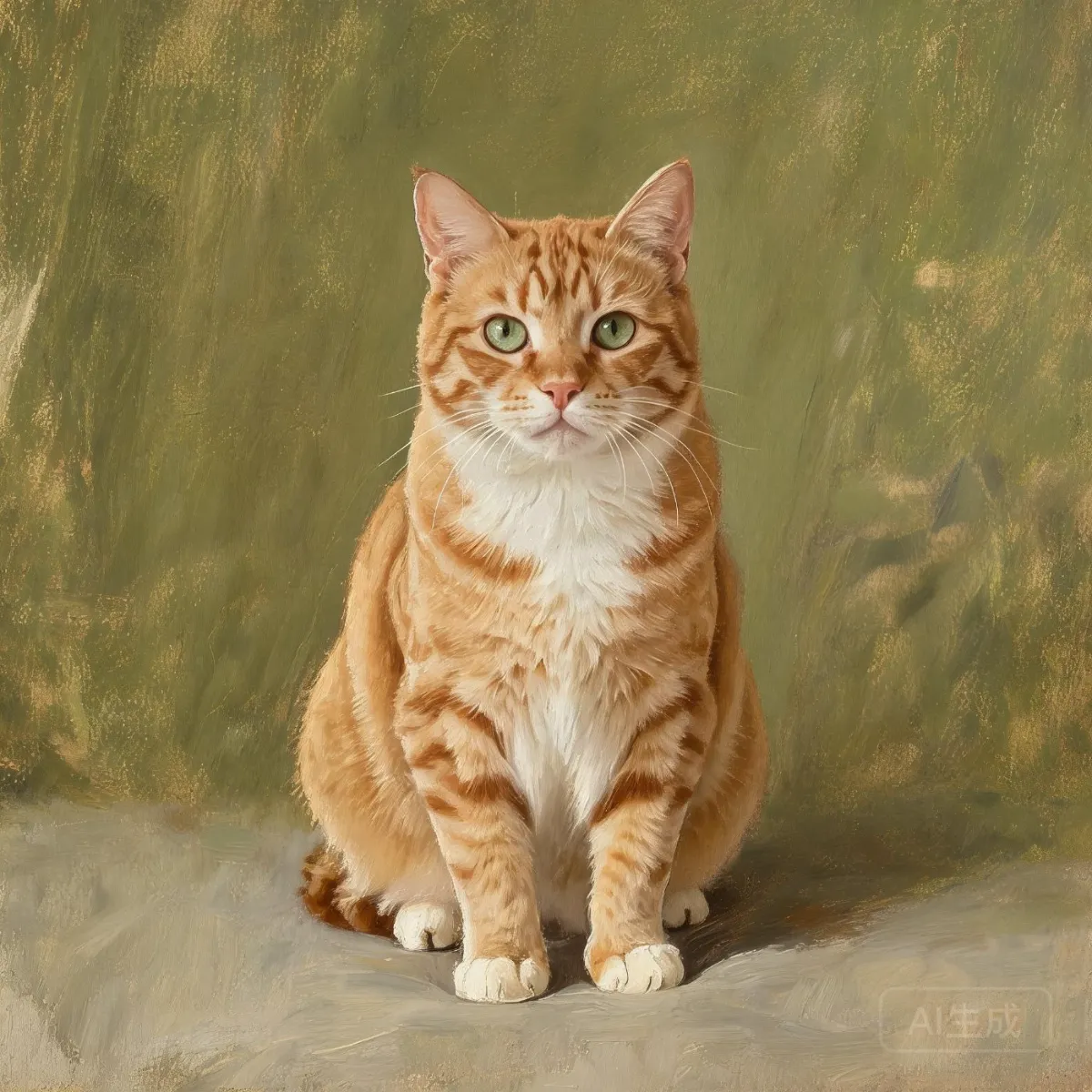
The coat color matches: the light-to-dark transitions of the orange, the direction of the tabby stripes on the face, and the lighter fur inside the ears all match. The ear shape and the intensity of the eye color are there too. The overall brushwork is visible—you can tell it's built up from oil paint, not smoothed out with a beauty filter.
The dark background makes the subject pop, and the canvas texture is visible at the edges of the highlights. As a "portrait hanging on the wall," it works.
Check three things on delivery
Step 1 — Breed features. Leg length, ear shape, eye color, tail shape. A husky painted with brown eyes, or a short-legged dog stretched out, means it was redrawn.
Step 2 — Marking positions. The position of every patch of color must be correct. This is what owners are most sensitive to.
Step 3 — Accessories. The collar is the easiest thing to change. The template explicitly forbids changing or adding one—if the original has a collar and you want to keep it, write the color and style into the description.
One more pattern: the angle follows the original image. If you want a profile, upload a profile photo; the model won't rotate the angle for you.
Commercial use: when taking orders, ask the client for 2–3 photos, generate three versions in one go for the client to choose from—cost 60 credits, about $0.4–1.8.
After the image comes out: download, check, rework
Don't click repeatedly while waiting. This time it took 36 seconds. The page will first show a placeholder block or a blurred preview, and the finished image appears only when progress completes. Clicking "Generate" again charges another 20 credits, and the two jobs will queue behind each other.
Download and naming. There's a download button below the result, and what you get is the original image at the generated size. When saving, put the use and date in the filename (for example etsy-pin-2026-11-15-v1) so you don't have to dig through chat history a week later.
Three checks. First, whether the subject's structure is distorted (a bottle turned into a cylinder, the wrong number of fingers, furniture floating off the ground); second, whether there are typos in any text in the image; third, whether there are dirty spots or extra props at the edges. If all three pass, you don't need to touch it again.
If you're not satisfied, change one sentence and run again. Don't rewrite the whole thing—rewriting means changing direction, and all your earlier judgment is wasted. Go back to the "Same cat, and also a painting" section above and change only one sentence according to the method described there, then spend another 20 credits to run it once. Failed jobs are refunded automatically, but they are not retried automatically—you need to click again yourself.
- 20 credits per image (about $0.13 on the largest plan, up to $0.60 on the smallest), 36 seconds this time
- 3 versions for one client = 60 credits; sell for $40–120, extremely high margin
- For comparison: hand-painted artists charge $150–500 with a four-week wait
- Note: get authorization for client photos; don't take orders using pet images found online
Related posts
Cinematic rainy neon: an image with a story, no photographer needed
2026-11-15 · Tutorials · 5 min read
Need a product image before you've shot anything: studio-grade shot, 20 credits
2026-11-15 · Tutorials · 5 min read
Studio portrait: 85mm, soft light, real pores, no plastic look
2026-11-15 · Tutorials · 4 min read