Expensive Products Prove Themselves with One Macro Shot
Buyers will pay $40 more for an $80 canvas bag because they can see the double-stitched edge and brass hardware. This template uses a 100mm macro lens and raking side light to maximize material and craftsmanship — and it won't retouch anything for you. 20 credits, 43 seconds.

The image most product pages are missing isn't the lifestyle shot — it's the macro shot. The white-background image proves "this thing exists," the lifestyle image proves "this is how it feels to use," and the macro image proves "it's worth the price."
Shooting macro requires a dedicated lens (a 100mm macro rents for $30–50 a day), ring light or raking side light, and focus stacking. Small sellers rarely go to that trouble for one detail shot.
The Prompt Makes "Real" a Hard Requirement
First, lock the material: "keeping the material and construction exactly as photographed — real stitching, real grain, real weave, real surface texture." Stitching, wood grain, weave, surface texture — each one named explicitly.
Then lock the optics: "100mm macro lens at f/4 with raking side light" — 100mm macro, f/4 aperture, raking side light. Raking light casts shadows across the texture's relief, and that is the fundamental reason macro shots look "textured" — not sharpening.
Then a string of "don'ts": "do not smooth, polish, idealise or repair anything," plus "no dust that was not there, no added scratches or wear." No smoothing, no polishing, no idealizing, no repairing — and no adding dust or scratches.
Those last two lines are the most honest part of this template: macro magnifies flaws, and it chooses to show them as they are rather than beautify them for you. That is also why it is more persuasive than a retouched image.
Before You Start: Login and Credits
Log in. Open slloy.com, click "Log in" in the top right, enter your email, and type in the 6-digit verification code. The site only supports code-based login, no password — just remember which email you used.
Credits. Generation is charged per run; this one costs 20 credits (about $0.13 on the largest plan, up to $0.60 on the smallest). Your balance is in the account panel in the top right — click to see it. If your balance is insufficient, the page will tell you directly and won't charge you for nothing.
Do you need to upload an image first? Yes — this is a "keep the original image, change only one thing" template. Without an upload you'll get a product the model invented, and credits are still charged. There's a reference image upload slot in the left column; just drag your photo in.
What the interface looks like. Once you're in the generator, the left column from top to bottom is: image/video toggle, model (Seedream 5.0 for this one), prompt library (shows "preset loaded" — the template has already filled in the words), prompt input box, style preset, aspect ratio (1:1 by default), number of images, and at the very bottom the generate button — on a long page you may need to scroll down a bit to see it. The right column is the preview area and recent works.
Steps: Fill In One Detail Name
Step 1 — Use case "Sell a product" → "Detail macro shot" → Generate the same.
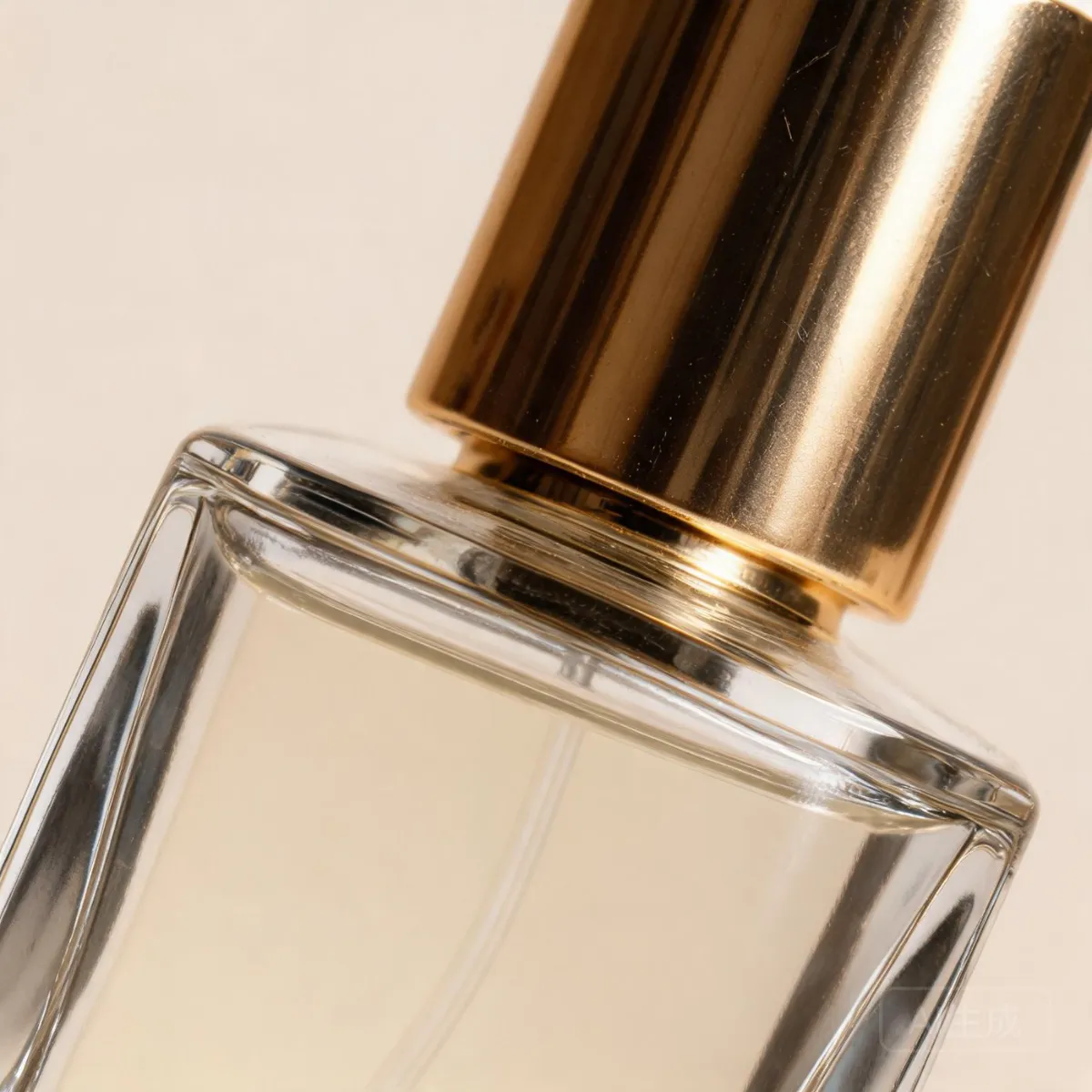
Step 2 — Upload a clear, well-lit product photo. Fill {product} with the product and {detail} with the part to magnify: "the top surface and ridged knurling of the gold cap." The detail must be specific to a part — don't just write the word "detail."
Step 3 — 1:1, 20 credits. This run took 43 seconds.

Placeholder Copy Sheet
The template has 2 slots wrapped in curly braces, and all of them need to be replaced with your own content — leave them blank and the model will make something up. The right column has sentences you can paste in directly; get it working first, then edit.
The Metal Texture Is Real, the Depth of Field Is Real
The brush direction on the gold cap's top surface, the chamfers on the knurling, the highlight along the edge — all match the reflection logic of real metal. The depth of field is believably shallow: the focal ring is crisp and falls off quickly toward front and back, with no fake macro where "the whole image is sharp."
Placed on the third or fourth screen of a product page, this kind of image isn't there to display — it's there to make people believe. Buyers may not be able to say why, but they'll feel "this seller makes things carefully."
Two Things You Must Think Through in Advance
Step 1 — Macro magnifies flaws. Crooked stitching, burrs on edges, uneven plating — all laid bare under macro. If it's a quality defect, fix the product first; if it's a material characteristic (wood grain, leather grain, handmade marks), write it into the copy and turn it into a selling point.
Step 2 — Don't let the model "fix" things for you. The prompt's prohibitions already say no polishing, no repairing, no added wear, but if you add "premium feel," "perfect," or "flawless" to your description, it will drift toward retouching. If you want credibility, don't use those words.
After the Image Comes Out: Download, Review, Rework
Don't click repeatedly while you wait. This run took 43 seconds. The page will show a placeholder block or blurry preview first; the finished image appears only when progress completes. Clicking "Generate" again charges another 20 credits, and the two jobs will queue behind each other.
Download and naming. There's a download button below the result; what you get is the original image at the generated size. Put the use case and date in the filename when you save it (e.g. etsy-pin-2026-11-15-v1) so you don't have to dig through chat history a week later.
Three review checks. One, is the subject's structure distorted (bottle turned into a cylinder, wrong number of fingers, furniture floating off the ground); two, is there any misspelled text in the image; three, are there dirty spots or extra props at the edges. If all three pass, you're done.
If you're not satisfied, change one sentence and rerun. Don't rewrite the whole thing — a rewrite means changing direction and throwing out all your earlier judgment. Go back to the "Two Things You Must Think Through in Advance" section above and change just one sentence the way it describes, then spend another 20 credits on a run. Failed jobs are refunded automatically, but they are not retried automatically — you need to click again yourself.
Cost
- 20 credits per image (about $0.13 on the largest plan, up to $0.60 on the smallest), 43 seconds this run
- Three macro shots per product (material, structure, brand engraving) = 60 credits
- For comparison: macro lens rental $30–50/day, photographer add-on detail shots $50–100 each
- The best value set: it replaces the most expensive, most troublesome kind of shoot
Related posts
Cinematic rainy neon: an image with a story, no photographer needed
2026-11-15 · Tutorials · 5 min read
Need a product image before you've shot anything: studio-grade shot, 20 credits
2026-11-15 · Tutorials · 5 min read
Studio portrait: 85mm, soft light, real pores, no plastic look
2026-11-15 · Tutorials · 4 min read