Step One of Opening a Shop: A Menu You Can Stick on the Wall
Coffee shops, bakeries, pop-up stalls — what they most often lack isn't a product, it's a cleanly typeset menu. This template produces a two-column layout with right-aligned prices and thin rule dividers, and it can also be shot as a flat lay on a wooden table. 20 credits.

Menu design costs between $150–600, and every revision adds more. Yet before you open, you're still adjusting product names — three versions of the menu is completely normal.
Lay it out yourself in Word and the line spacing and column widths never line up; use a Canva template and it looks like a template at a glance.
The prompt breaks the layout into executable rules
Paper and heading: "{paper} paper stock, a heading set in {typeface} that reads the single word MENU at the top". Paper stock, typeface, and the heading says only the one word MENU — less is more.
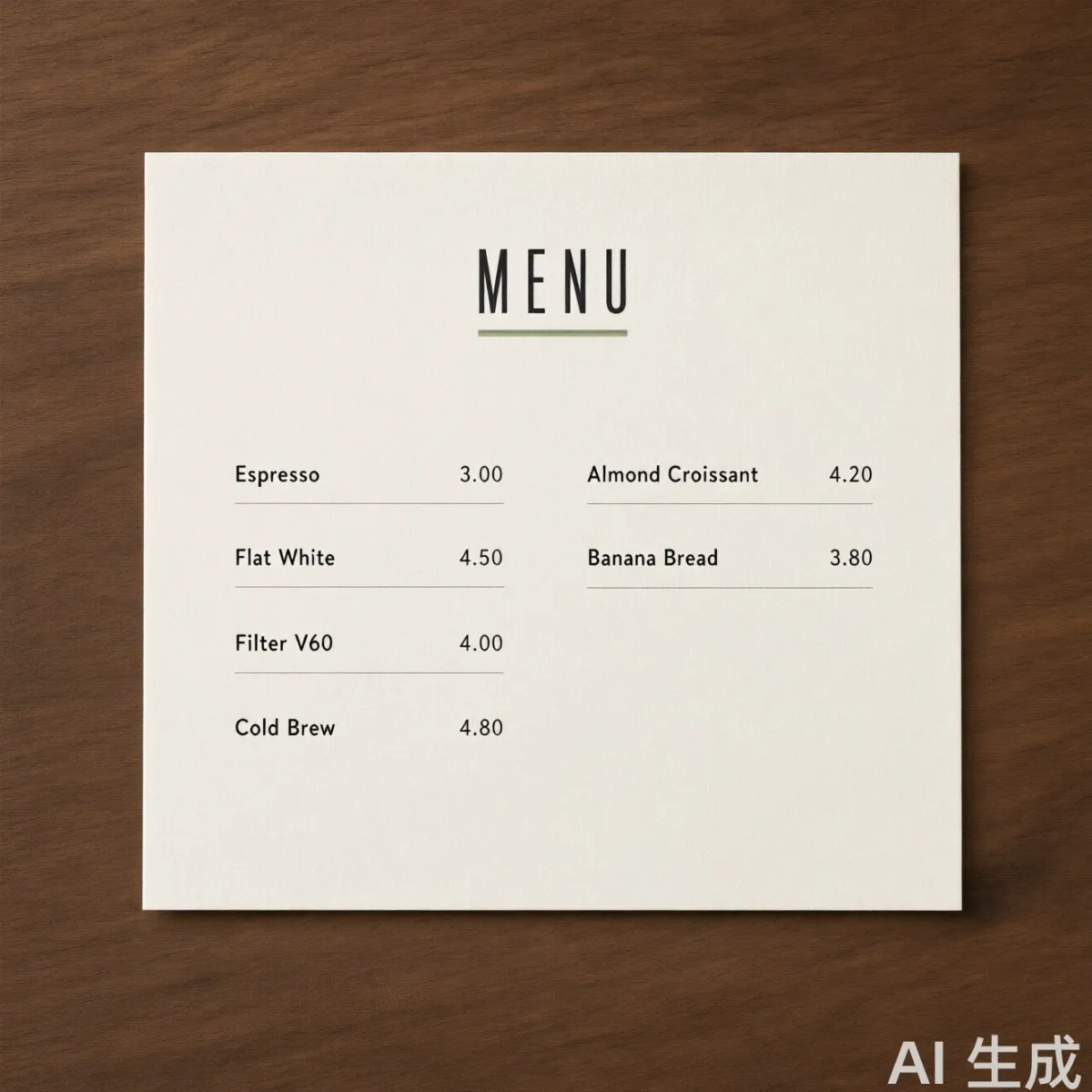
Two columns and prices: "these items arranged in two columns — {dishes} — with prices aligned right on one baseline". Two columns, prices right-aligned and sitting on the same baseline. This sentence is the dividing line between "looks professional" and "looks homemade".
Dividers and whitespace: "thin hairline rules between the sections, one small {accent} accent rule, generous white space". Hairline rules separating sections, one short accent-color rule, plenty of white space.
How it's shot: "photographed top-down as a flat lay on a wooden table in {table} tone" — shot top-down as a flat lay on a wooden table. This step makes it look like a "photo of the real thing" rather than a design mockup.
Text requirements: "Spell every dish name and price exactly as written in this prompt; no placeholder text, no extra items". Spell everything exactly, no placeholders, no extra items.
The negative list at the end matters too: no logo, no watermark, no hands. The moment a hand enters the frame, the whole image becomes an "influencer photo" instead of a "menu".
Before you start: login and credits
Log in. Open slloy.com, click "Log in" in the top right, enter your email, and type in the 6-digit verification code you receive. The site only supports code-based login, no password — just remember which email you used.
Credits. Generation is charged per run; this one is 20 credits (about $0.13 on the largest plan, up to $0.60 on the smallest). Your balance is in the account panel in the top right — open it to see it; if the balance is insufficient the page tells you directly and won't charge you for nothing.
Do you need to upload an image first for this one? No — the prompt is complete on its own, so leave the upload box empty. Uploading an extra image only makes it harder for the model to tell which one to follow.
What the interface looks like. After entering the generator, the left column from top to bottom is: image/video toggle, model (Qwen-Image for this one), prompt library (shows "preset loaded" — the template has already filled in the words for you), prompt input box, style presets, aspect ratio (default 1:1), number of images, and at the very bottom the generate button — on a long page you have to scroll down a bit to see it. The right column is the preview area and recent works.
Steps: fill in six things, retry on failure
Step 1 — Use case "make brand assets" → "coffee shop one-page menu" → generate the same.
Step 2 — Fill in one by one: venue ("a neighborhood coffee shop"), paper ("off-white uncoated paper"), typeface ("geometric sans-serif"), items (six, with prices), accent color, table wood tone.
Step 3 — 1:1, 20 credits. This time the first call failed and the credits were automatically refunded; the retry succeeded, 124 seconds total.
Placeholder copy sheet
The template wraps the blanks in curly braces — 6 in total, all of which you need to replace with your own content. Leave them unfilled and the model will make something up. The right column has sentences you can paste in directly; get it running first, then change them.
The two-column alignment is right, and that's not easy
Six item names split across two columns, with all prices right-aligned and sitting on the same baseline — this is the spot where typesetting most easily falls apart, and it nailed it. The spacing of the hairline rules between names and prices controls the rhythm, and not a single rule is crooked.
Shot top-down on a wooden table, the paper has a slight fiber texture, light falls evenly from above with no glare spots. The whole image looks like it's "already printed and sitting in the shop", not like a PNG.
But the first call failed. This has to be said clearly: a task like a menu — "multiple lines of text + alignment" — is harder than a single-line slogan, and the failure rate is higher. The 20 credits were refunded, and only the retry succeeded.
Three checks before publishing
Step 1 — Read the item names line by line. One wrong letter in six lines and it's ruined. Pay special attention to words of similar length (Latte / Latte Macchiato) and letters that are easy to misread.
Step 2 — Check every price one by one. Prices drifting left or a misplaced decimal point is the most common failure. Compare against the list you entered, one by one.
Step 3 — See if there's enough white space. A menu gets stuck on a wall or stood on a table; not enough margin around the edges looks cramped. If it's not enough, rerun it — don't fix it by cropping.
Practical tip: generate two at once (40 credits) and pick the one with better alignment. A menu is long-term material; spending an extra $0.13 is well worth it.
After the image comes out: download, acceptance, rework
Don't click repeatedly while waiting. This one took 124 seconds. The page shows a placeholder block or blurry preview first; only when progress completes is it the final result. Clicking "generate" again charges another 20 credits, and the two jobs queue behind each other.
Download and naming. There's a download button below the result; what you get is the original image at the generated size. When saving, put the use and date in the filename (e.g. etsy-pin-2026-11-15-v1) so you don't have to dig through chat logs a week later.
Three acceptance checks. One, is the main structure deformed (bottle turned into a cylinder, wrong number of fingers, furniture floating off the ground); two, are there typos in the text in the image; three, are there dirty spots or extra props at the edges. If all three pass, leave it alone.
If you're not satisfied, change one sentence and rerun. Don't rewrite the whole thing — rewriting means changing direction, and all your earlier judgment is wasted. Go back to the "Steps: fill in six things, retry on failure" section above and change only one sentence the way described there, then spend another 20 credits on one run. Failed jobs are refunded automatically, but they are not retried automatically — you need to click again yourself.
- 20 credits per image (about $0.13 on the largest plan, up to $0.60 on the smallest); this time two calls took 124 seconds total
- Recommend generating 2–3 at once and picking one, within 60 credits
- For comparison: menu design is $150–600, with revisions charged per round
- Note: proof before actual printing to confirm paper color and text contrast under CMYK
Related posts
Cinematic rainy neon: an image with a story, no photographer needed
2026-11-15 · Tutorials · 5 min read
Need a product image before you've shot anything: studio-grade shot, 20 credits
2026-11-15 · Tutorials · 5 min read
Studio portrait: 85mm, soft light, real pores, no plastic look
2026-11-15 · Tutorials · 4 min read