If your screen print uses only one screen, don't give it a gradient
A single-color screen-printed T-shirt costs $15–35 per color to make the screen, and the unit price drops as the print run grows. But the artwork has to suit the process: hard edges, solid color, thick enough lines. This template produces artwork to screen-print specs, one image in 35 seconds.

A lot of people take a beautiful illustration to a screen printer and end up with a mess: gradients turn into blocks of color, thin lines break into dashes, shadows blur into one mass.
It's not that the print shop is bad — the artwork doesn't suit the process. Screen printing is "one screen, one ink," and it simply cannot print continuous tone.
The prompt turns process limits into conditions
Single color: "printed in {ink} ink only" — one ink only.
Hard edges: "Flat solid shapes, hard clean edges, high contrast against a plain background," and it spells out everything that must not appear: "no gradients, no soft shading, no halftone dots, no photographic texture, no transparency and no glow."
Line width: "Keep every line at least one millimetre thick at chest-print size so it will not break down on a mesh screen" — at chest-print size every line must be at least 1mm, or it will break up on the mesh.
Spacing: "keep gaps between shapes wide enough that ink does not bleed together" — the gaps between shapes must be wide enough, or the ink will bleed together.
Legibility: "Strong silhouette that still reads from three metres away" — still recognizable from three meters away. That's the actual viewing distance for a T-shirt graphic.
No mock-up: "no mock-up shirt and no fabric texture — the artwork alone." What's wanted is the graphic itself, not a render of it on a model.
"no mock-up shirt" is easy to overlook: many people want a "T-shirt mock-up," but what screen-making needs is a clean graphic. Mock-ups can be composited later; the screen file must not have a shirt in it.
Before you start: login and credits
Log in. Open slloy.com, click "Log in" in the top right, enter your email, and type in the 6-digit verification code. The site only supports code-based login, no password — just remember which email you used.
Credits. Generation is charged per run; this one is 20 credits (about $0.13 on the largest plan, up to $0.60 on the smallest). Your balance is in the account panel in the top right — click to open it and see. If the balance is too low, the page tells you directly and won't charge you for nothing.
Do you need to upload an image first for this one? No — the prompt is complete on its own, so leave the upload box empty. Uploading an extra image only makes it harder for the model to tell which one to follow.
What the interface looks like. Once you're in the generator, the left column from top to bottom is: image/video toggle, model (Seedream 5.0 for this one), prompt library (shows "preset loaded" — the template has already filled in the words for you), prompt input box, style preset, aspect ratio (2:3 by default), number of images, and at the very bottom the generate button — on a long page you may need to scroll down a bit to see it. The right column is the preview area and recent works.
Steps: fill in two blanks
Step 1 — Use case "make a printable image" → "single-color graphic that can be screen printed" → generate the same.
Step 2 — Fill {subject} with the graphic content ("a standing fox silhouette with its tail curled up"), and {ink} with the ink color ("ochre yellow").
Step 3 — 2:3, 20 credits, generate. This time 35 seconds.
Placeholder copy sheet
The template has 2 blanks wrapped in curly braces, and all of them need to be replaced with your own content — if you leave them unfilled, the model will make something up. The right column has sentences you can paste in directly; get it working first, then change them.
Ready to go straight to screen
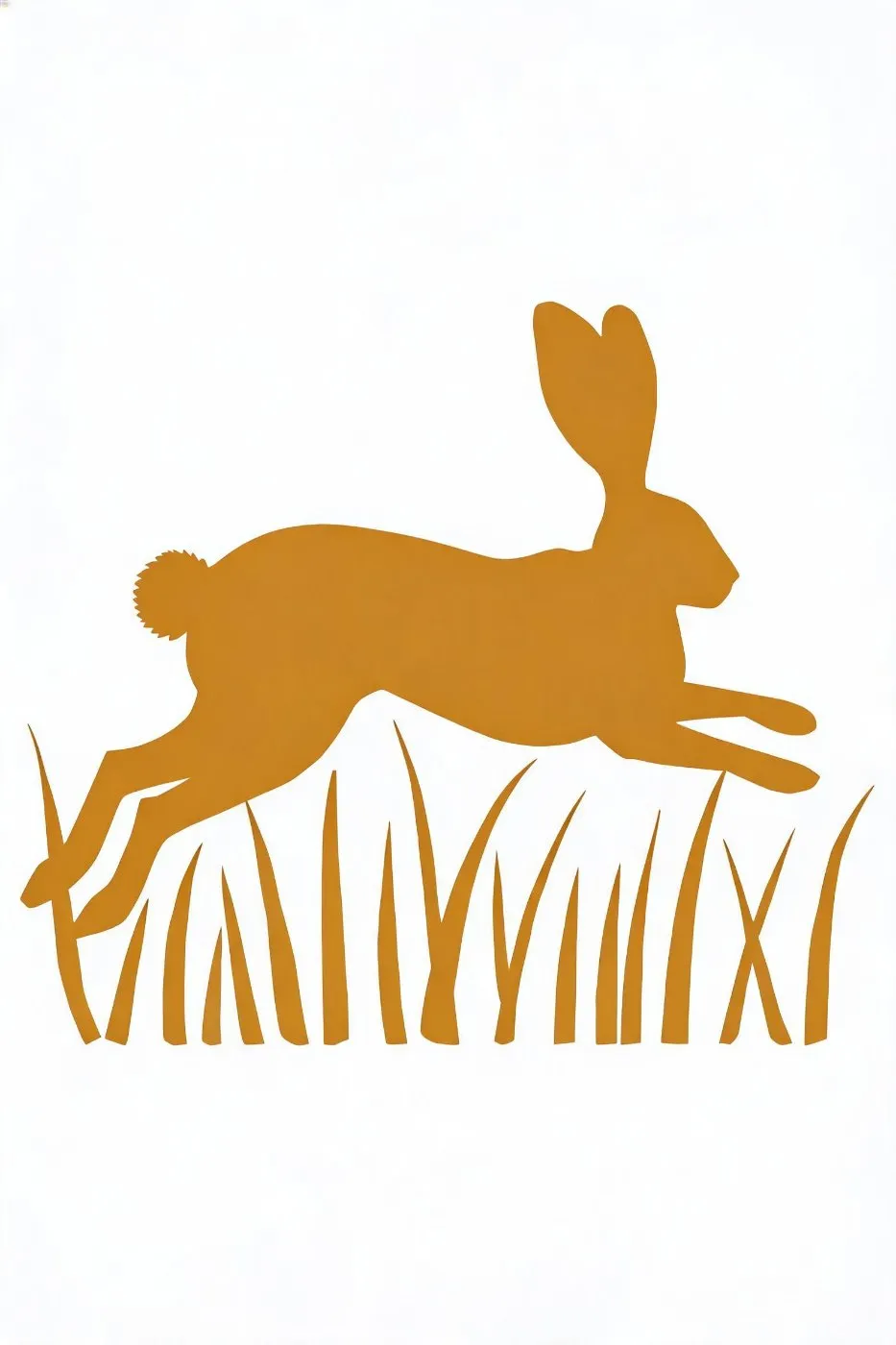
The whole image is one color, the edges are hard, and there are no intermediate transition layers — exactly what screen printing needs. Line thickness is consistent, with no strokes thinner than 1mm; the gaps between shapes are wide enough that the ink won't bleed together during printing.
The silhouette is strong — shrunk down and viewed from 3 meters away, it's still a clear shape. As a chest-print graphic, it can go to screen-making without any modification.
Three checks before making the screen
Step 1 — Check for gradients by zooming in. Some areas that "look solid" on screen actually have a faint transition, and it gets flattened when printed. Zoom to 200% and look at the edges — every boundary should be a hard edge.
Step 2 — Measure the thinnest line. Converted to the actual chest-print size (about 30 cm wide), the thinnest line must be ≥1mm. If it isn't, simplify the graphic.
Step 3 — Confirm it's a single-color file. Screen-making needs a vector or high-contrast bitmap (1-bit); grayscale will be reprocessed by the technician and detail is easily lost.
The cost math: screen-making is $15–35 per color, and printing 50 pieces runs $3–6 each. The design fee you save on the artwork is enough to print a hundred shirts.
After the image comes out: download, check, redo
Don't click repeatedly while you wait. This one takes 35 seconds. The page shows a placeholder block or blurry preview first, and the finished image appears when progress completes. Clicking "generate" again charges another 20 credits, and the two jobs queue behind each other.
Download and naming. There's a download button below the finished image, and what you get is the original at the generated size. When you save it, put the use and date in the filename (e.g. etsy-pin-2026-11-15-v1) so you don't have to dig through chat logs a week later.
Three checks. First, whether the subject's structure is distorted (a bottle turned into a cylinder, the wrong number of fingers, furniture floating off the ground); second, whether any text in the image has typos; third, whether there are dirty spots or extra props at the edges. If all three pass, you don't need to touch it again.
If you're not satisfied, change one sentence and run again. Don't rewrite the whole thing — rewriting means changing direction, and all your earlier judgment is wasted. Go back to the "Ready to go straight to screen" section above and change just one sentence following the fix described there, then spend another 20 credits on one more run. Failed jobs are refunded automatically, but they are not retried automatically — you need to click again yourself.
- 20 credits per image (about $0.13 on the largest plan, up to $0.60 on the smallest), 35 seconds this time
- A set of 3 graphics in the same series = 60 credits, made in three colors
- For comparison: screen-print graphic design runs $80–300 each
- Note: for commercial use, avoid recognizable characters and brands; it's worth running a trademark search on the graphic itself
Related posts
Cinematic rainy neon: an image with a story, no photographer needed
2026-11-15 · Tutorials · 5 min read
Need a product image before you've shot anything: studio-grade shot, 20 credits
2026-11-15 · Tutorials · 5 min read
Studio portrait: 85mm, soft light, real pores, no plastic look
2026-11-15 · Tutorials · 4 min read